【n8n网络问题】解决”connection timed out; no servers could be reached“等n8n无法与外部网络通信或超时问题
本文将一步步解释如何排除错误,以及列出最后的解决方案
在设置n8n节点的时候,想连接github,遇到了无法与外部通信,报错connection timed out; no servers could be reached问题
报错信息
本文将一步步解释如何排除错误,以及列出最后的解决方案
首先列出报错信息
{

  "errorMessage": "The DNS server returned an error, perhaps the server is offline",

  "errorDetails": {

    "rawErrorMessage": [

      "getaddrinfo EAI_AGAIN api.github.com",

      "getaddrinfo EAI_AGAIN api.github.com"

    ],

    "httpCode": "EAI_AGAIN"

  },

  "n8nDetails": {

    "nodeName": "github_data",

    "nodeType": "n8n-nodes-base.httpRequest",

    "nodeVersion": 4.2,

    "itemIndex": 0,

    "time": "2025/7/27 13:50:13",

    "n8nVersion": "1.103.2 (Self Hosted)",

    "binaryDataMode": "default",

    "stackTrace": [

      "NodeApiError: The DNS server returned an error, perhaps the server is offline",

      "    at ExecuteContext.execute (/usr/local/lib/node_modules/n8n/node_modules/.pnpm/n8n-nodes-base@file+packages+nodes-base_@aws-sdk+credential-providers@3.808.0_asn1.js@5_1af219c3f47f2a1223ec4ccec249a974/node_modules/n8n-nodes-base/nodes/HttpRequest/V3/HttpRequestV3.node.ts:780:15)",

      "    at processTicksAndRejections (node:internal/process/task_queues:105:5)",

      "    at WorkflowExecute.runNode (/usr/local/lib/node_modules/n8n/node_modules/.pnpm/n8n-core@file+packages+core_openai@5.8.1_ws@8.17.1_zod@3.25.67_/node_modules/n8n-core/src/execution-engine/workflow-execute.ts:1211:9)",

      "    at /usr/local/lib/node_modules/n8n/node_modules/.pnpm/n8n-core@file+packages+core_openai@5.8.1_ws@8.17.1_zod@3.25.67_/node_modules/n8n-core/src/execution-engine/workflow-execute.ts:1581:27",

      "    at /usr/local/lib/node_modules/n8n/node_modules/.pnpm/n8n-core@file+packages+core_openai@5.8.1_ws@8.17.1_zod@3.25.67_/node_modules/n8n-core/src/execution-engine/workflow-execute.ts:2157:11"

    ]

  }

}
首先需要进入docker命令行
docker ps
复制contatinerID ,替换下列占位符
docker exec -it 【替换】 /bin/sh~ $ cat /etc/resolv.conf
进入docker命令符,进行常规ping看是否能ping通
ping -c 4 8.8.8.8
-
如果成功:说明容器的基础网络是通的,问题基本可以确定在 DNS 解析上。我的ping通了
-
如果失败 (e.g., Network is unreachable):说明容器的网络配置有严重问题,无法访问外部。你需要检查 Docker 的网络模式(bridge, host 等)或宿主机的防火墙规则。
尝试解析出错的域名
~ $ nslookup api.github.com
;; connection timed out; no servers could be reached
出错,就确认了是 DNS 问题
尝试利用谷歌dns解析
~ $ nslookup api.github.com 8.8.8.8
Server:         8.8.8.8
Address:        8.8.8.8:53

Non-authoritative answer:

Non-authoritative answer:
Name:   api.github.com
Address: 20.205.243.168
成功解析,说明是dns的问题
解决方法
打开docker desktop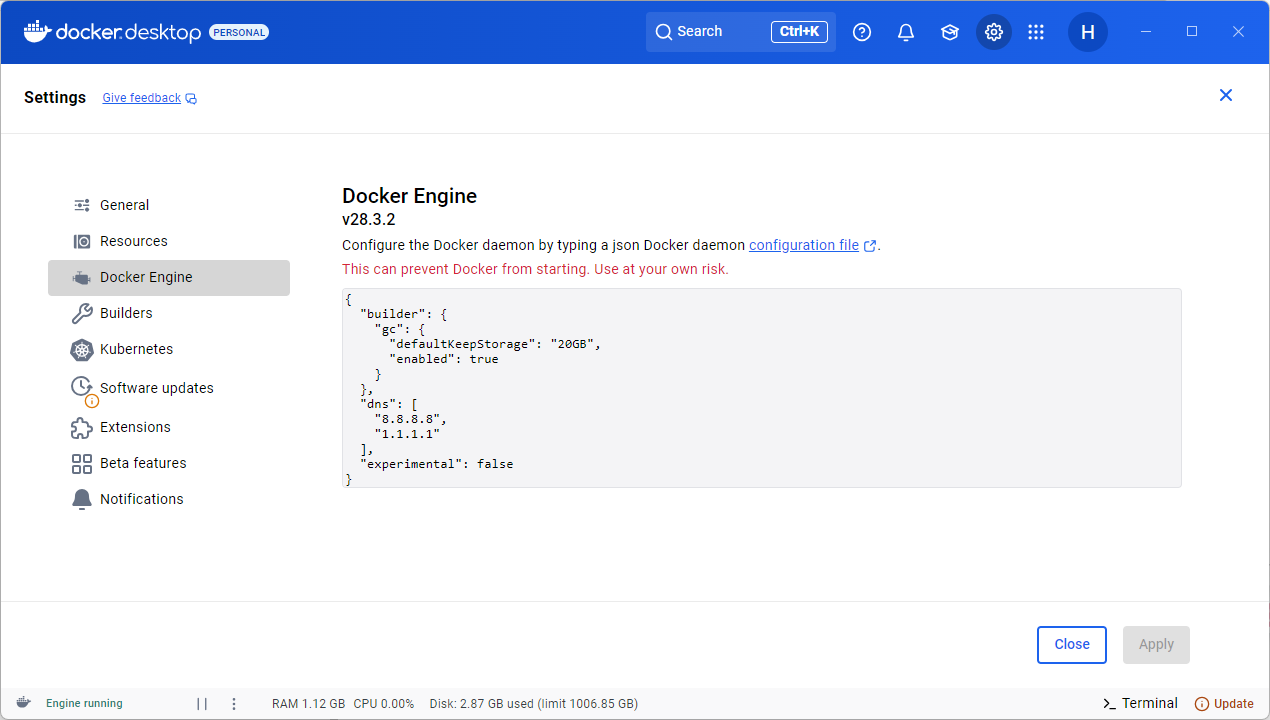
插入,利用已知的dns进行解析即可
{
  "builder": {
    "gc": {
      "defaultKeepStorage": "20GB",
      "enabled": true
    }
  },
  "experimental": false,
  "dns": [
    "8.8.8.8",
    "1.1.1.1"
  ]
}
发现可以执行
问题解析
问题的根本原因是 DNS 解析失败。具体来说,是运行 n8n 的 Docker 容器在其独立的网络命名空间内,无法通过 Docker Desktop 默认的嵌入式 DNS 服务器 (192.168.65.7) 解析外部域名。
在docker内部的dns服务器上,器监听在 Docker 虚拟网络的一个内部 IP 上,接收来自所有容器的 DNS 查询请求,然后将这些请求转发给宿主机的网络接口所配置的 DNS 服务器。但是如果该配置出问题,这个时候我们需要利用公用的dns进行解析,才可以执行

火山引擎开发者社区是火山引擎打造的AI技术生态平台,聚焦Agent与大模型开发,提供豆包系列模型(图像/视频/视觉)、智能分析与会话工具,并配套评测集、动手实验室及行业案例库。社区通过技术沙龙、挑战赛等活动促进开发者成长,新用户可领50万Tokens权益,助力构建智能应用。
更多推荐
 10
10 0
0- 0



 已为社区贡献9条内容

所有评论(0)