企业级AI落地项目系列课程详解 -> 点击进入
- vLLM开启思考模式对话效果展示(同SGLang)
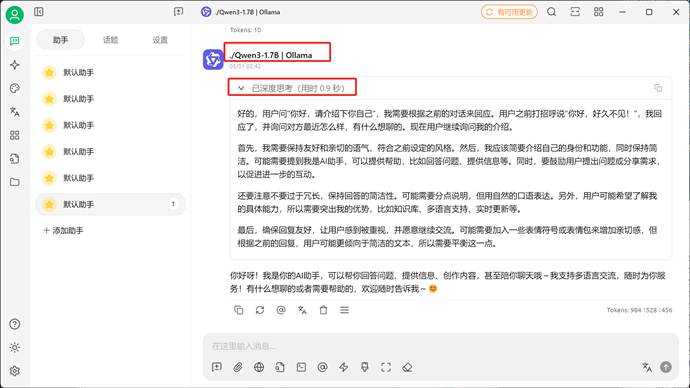
- vLLM关闭思考模式对话效果展示(同SGLang)
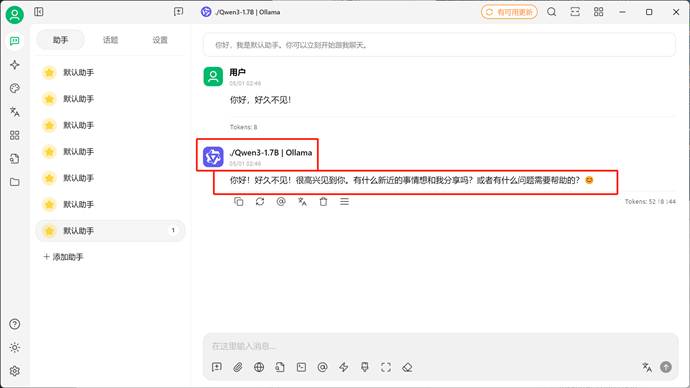
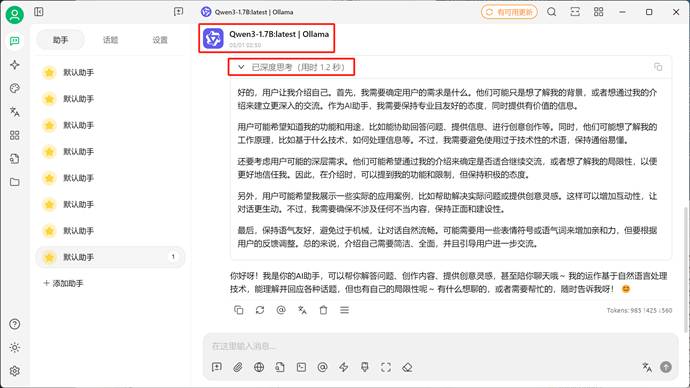
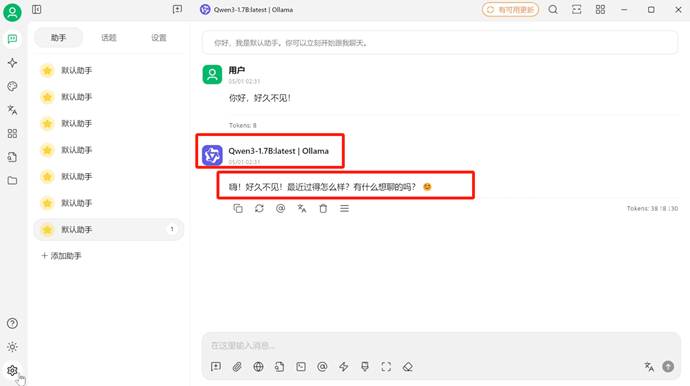
1. Qwen3模型思考模式切换基本方法
作为混合推理模型,能够自由的开启和关闭思考模式至关重要,根据官方说明,Qwen3系列模型默认是开启思考模式的,而在某些时候确实不需要模型进行思考,此时有两种方法能够关闭模型思考方式:
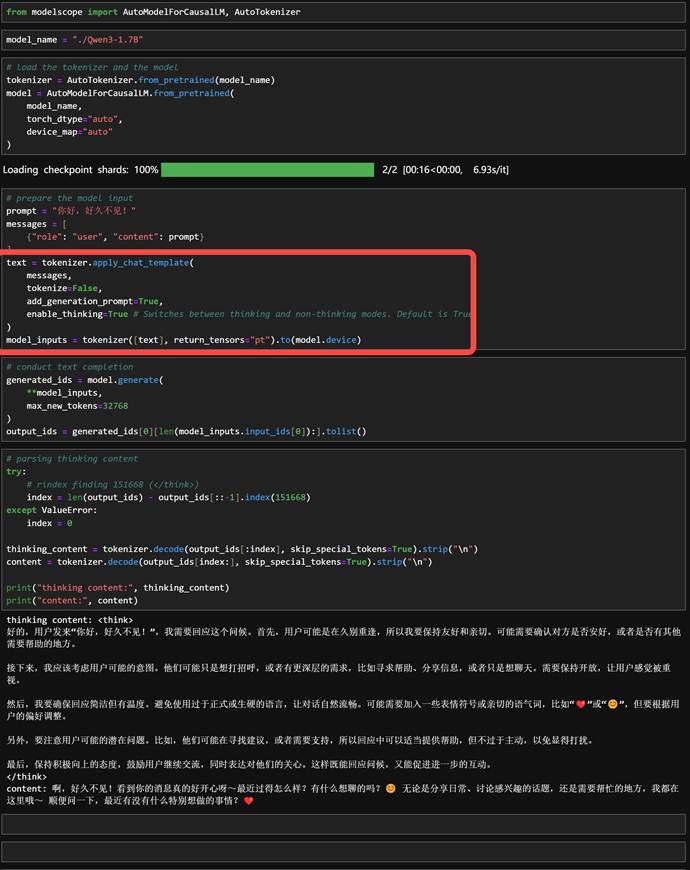
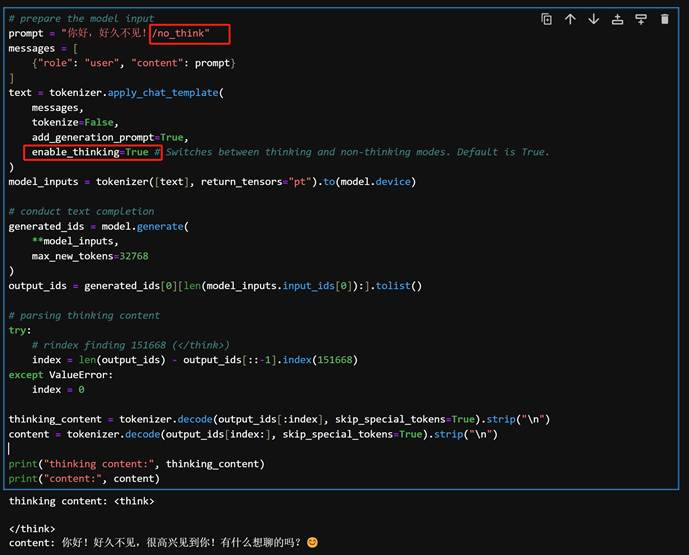
- 其一是“硬关闭”方法,通过一些模型调用框架的参数设置来开启或者关闭模型思考,例如如果是使用transformers框架进行模型调用,则可以通过设置enable_thinking=True 或 False来决定是否开启思考,如下则是开启思考:
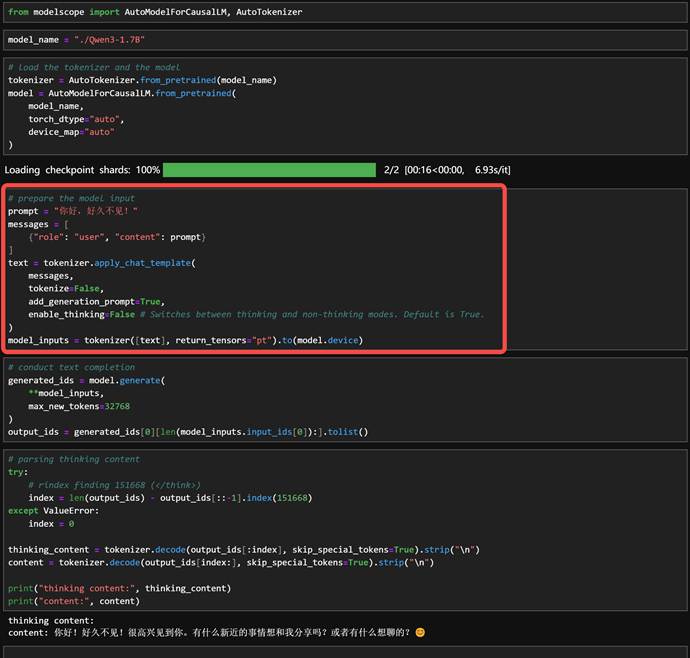
- 而enable_thinking=False则是关闭思考
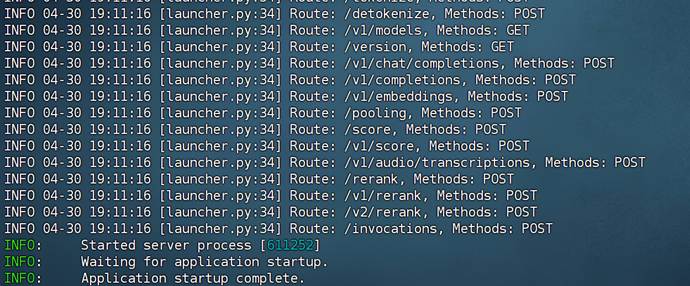
- 类似的vLLM或者SGLang也可以通过参数设置关闭或开启思考
|
Bash
CUDA_VISIBLE_DEVICES=0,1 vllm serve ./Qwen3-1.7B --tensor-parallel-size 2 |
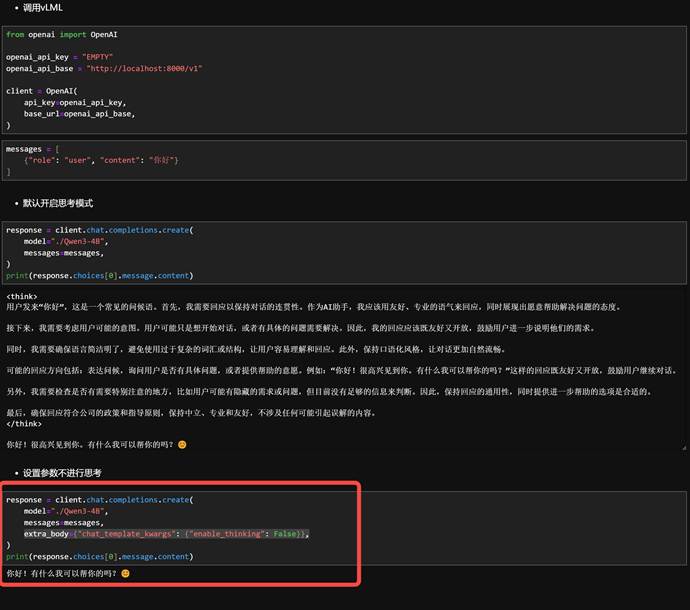
- 通过关键参数设置extra_body={"chat_template_kwargs": {"enable_thinking": False}},决定模型是否进行思考:
- 除此之外,还有一种“软关闭”的方法,即无论使用何种框架无论如何设置参数,都可以在输入内容的时候通过添加 /think 和 /no_think 来逐轮切换模型的思考模式:
2.Qwen3模型思考方式切换的底层逻辑
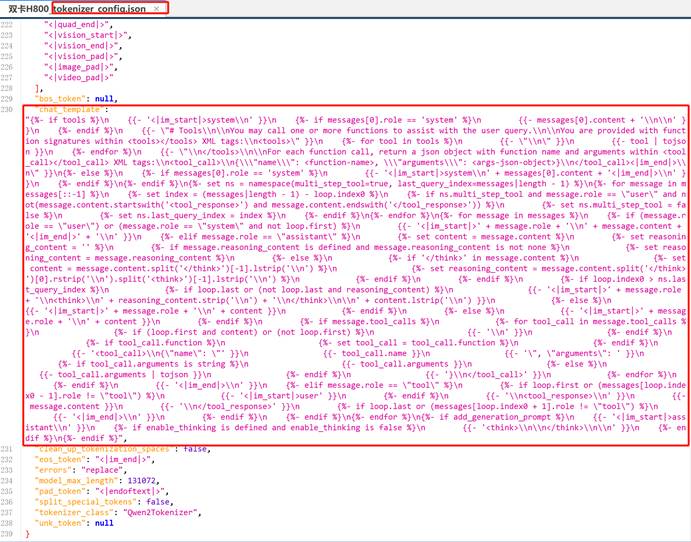
而实际上,作为语言模型,影响模型行为的一定是“输入的内容”,因此,哪怕是我们通过一些参数设置,实际上也是影响模型最终的输入,这点我们可以通过解析Qwen3内置提示词模板进行解读:以下是Qwen3内置提示词模板解析:
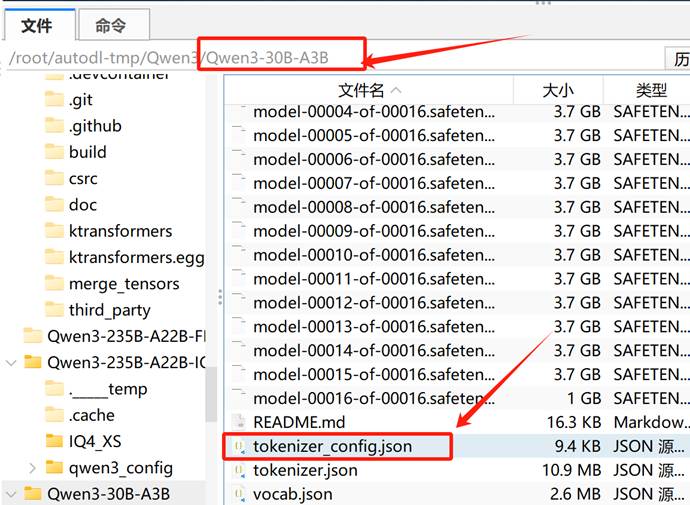
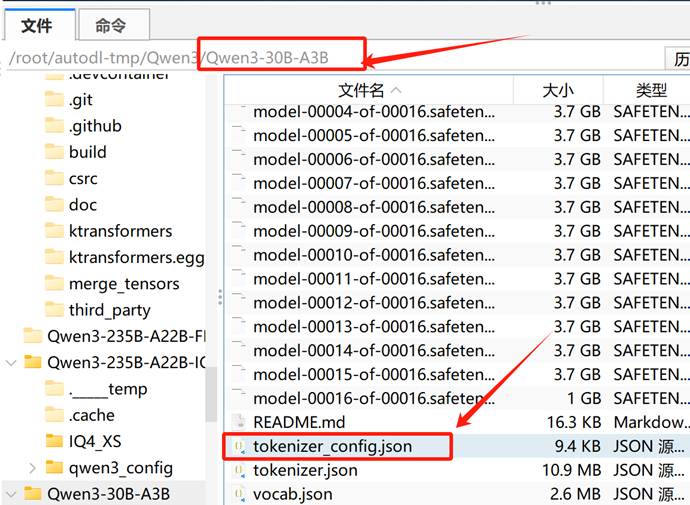
内置提示词模板可以在任意模型的tokenizer_config.json中查看:
你以为的模型输入:
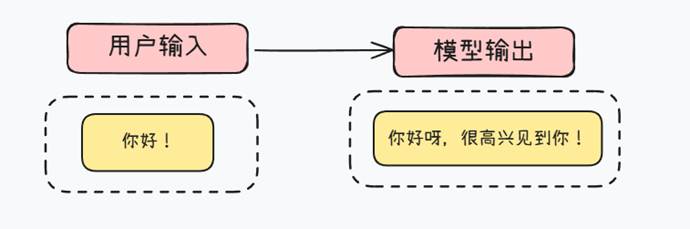
真实的模型输入:

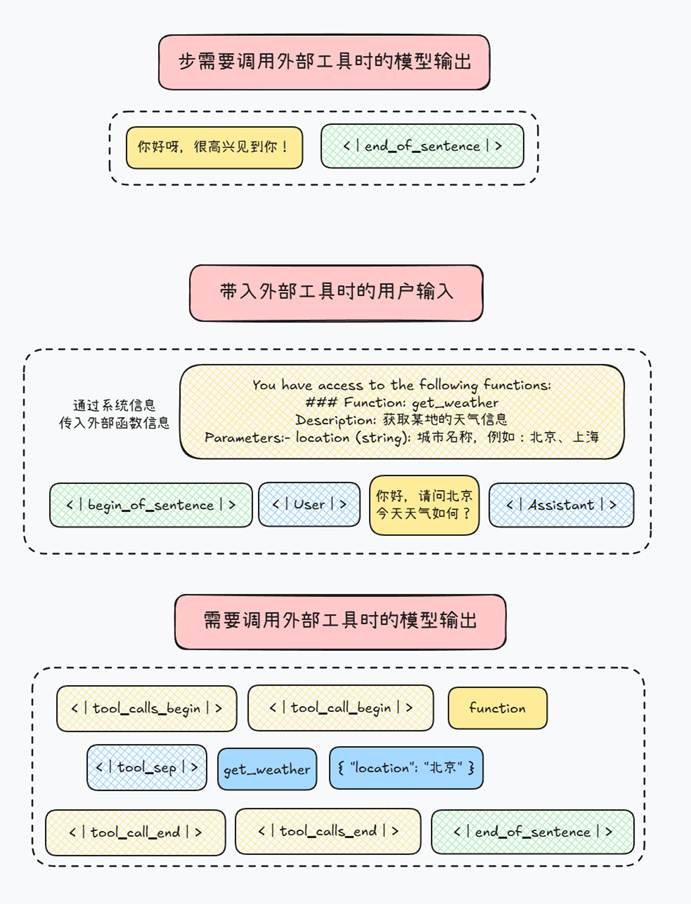
也就是说,模型通过这些特殊字符标记的格式来影响模型行为。对于Qwen3来说提示词模板如下:
内置提示词模板可以在任意模型的tokenizer_config.json中查看:
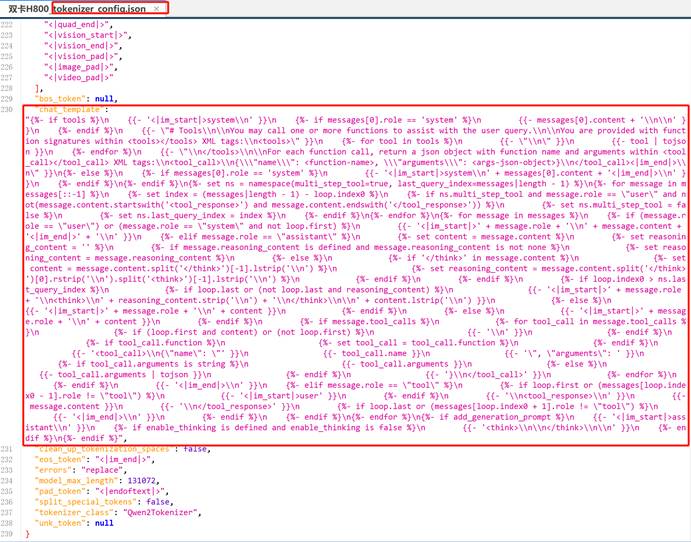
Part 1.工具调用(Function Calling)支持部分
|
Plaintext
{%- if tools %}
{{- '<|im_start|>system\n' }}
{%- if messages[0].role == 'system' %}
{{- messages[0].content + '\n\n' }}
{%- endif %}
{{- "# Tools\n\nYou may call one or more functions to assist with the user query.\n..." }}
... |
解释:
- 如果传入了 tools(即 function calling 的函数签名),会优先构造 <|im_start|>system 开头的一段系统提示,告诉模型可以调用工具。
- tools 列表,每个工具(函数)都通过 tojson 转换为 JSON;
- 如何使用 <tool_call> 标签返回工具调用的结果。
Part 2.系统消息处理
|
Plaintext
{%- if messages[0].role == 'system' %}
{{- '<|im_start|>system\n' + messages[0].content + '<|im_end|>\n' }}
{%- endif %} |
解释:
- 如果首条消息是 system,则会作为系统设定(system prompt)处理,加上 <|im_start|>system\n ... <|im_end|>\n。
Part 3.多轮消息回显处理
|
Plaintext
{%- for message in messages %}
{%- if (message.role == "user") ... %}
{{- '<|im_start|>' + message.role + '\n' + message.content + '<|im_end|>' + '\n' }} |
解释:
- 针对用户(user)、助手(assistant)、工具响应(tool)等不同角色进行处理。
- 使用 <|im_start|>role\n...<|im_end|> 包裹每一轮对话。
4Assistant 角色的特殊处理(含推理内容)
|
Plaintext
{%- if message.role == "assistant" %}
...
<think>\n...reasoning_content...\n</think> |
解释:
- 若助手消息中包含 <think> 内容,会将其拆分为“推理部分”和“回复正文”。
- 如果存在 tool_calls,还会附加一段 <tool_call> JSON 标签。
Part 5.工具响应处理(role = tool)
|
Plaintext
<tool_response>\n...内容...\n</tool_response> |
解释:
- 模型回复 <tool_call> 后,你会给出 <tool_response>。
- 这部分内容会包在 user role 内部,以 <tool_response> 标签封装,用来模拟用户获得工具调用结果。
Part 6.混合推理模式开启方法
|
Plaintext
{%- if add_generation_prompt %}
{{- '<|im_start|>assistant\n' }}
{%- if enable_thinking is defined and enable_thinking is false %}
{{- '<think>\n\n</think>\n\n' }}
{%- endif %}
{%- endif %} |
解释:
- 如果需要生成下一轮回复,会在最后加上 <|im_start|>assistant\n 作为提示。
- 还可以通过设置 enable_thinking=false,强制加上 <think> 占位符。
因此,真实影响Qwen3是否开启混合推理模式的参数只有这段:
|
Plaintext
{%- if enable_thinking is defined and enable_thinking is false %} |
默认情况是开启思考模式,而当用户输入参数指定不思考的时候,才不会进行思考。因此如果想要永久调整模型是否思考,可以直接修改提示词模板。
3.修改模型提示词模板控制模型思考行为
在默认情况下是会进行思考的:
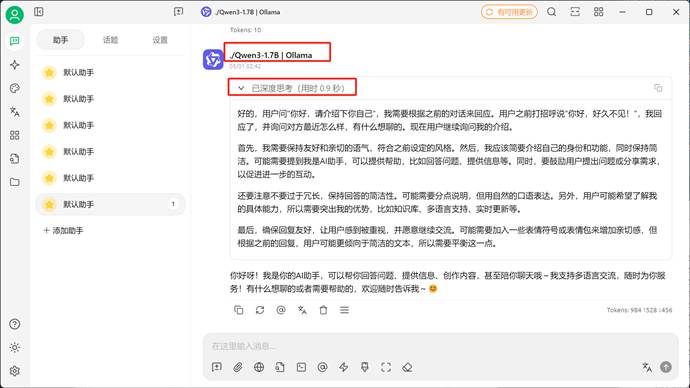
接下来我们可以将这句:
|
Plaintext
{%- if enable_thinking is defined and enable_thinking is false %} |
改为:
|
Plaintext
{%- if enable_thinking is not defined or enable_thinking is false %} |
则表示默认情况下不开启思考。此时修改如下:
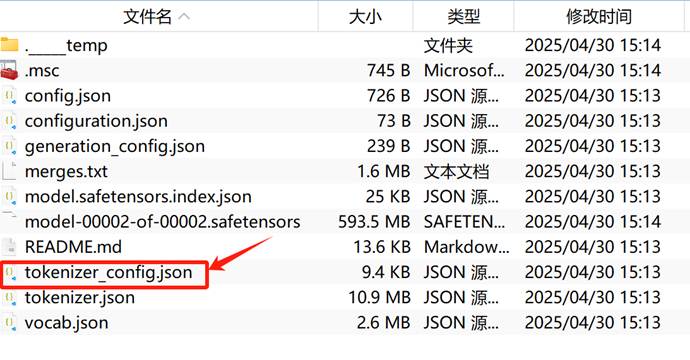
将这句:
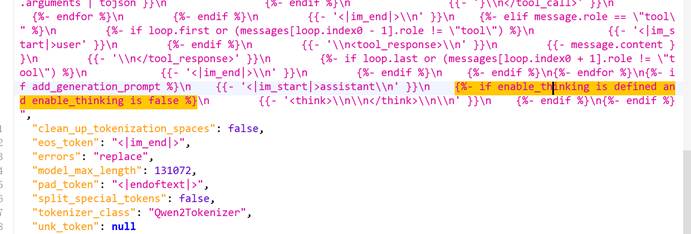
改为这句:
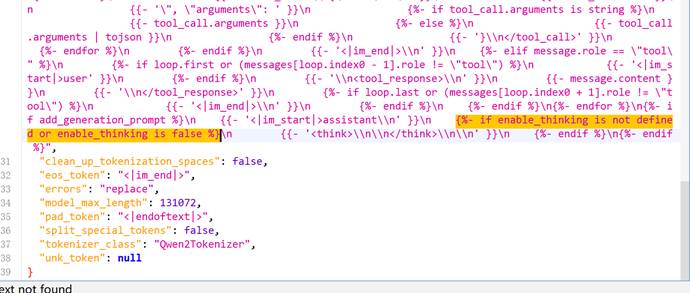
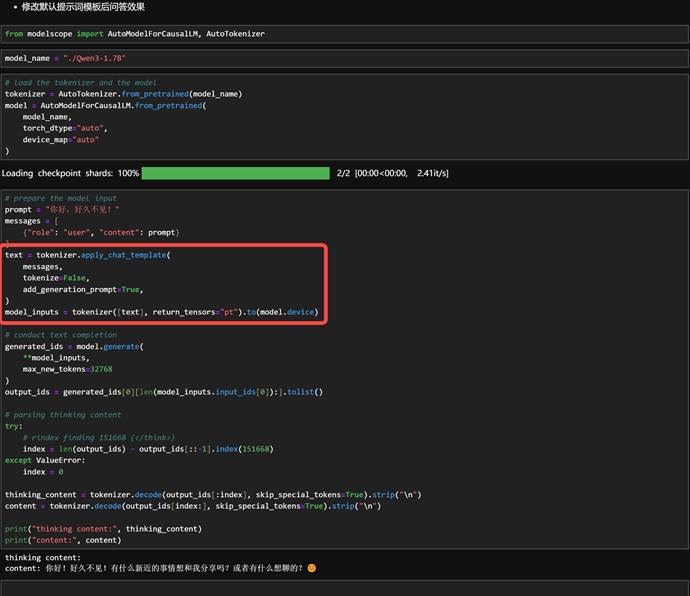
保存并退出。此时默认情况下调用该模型就是关闭思考模式的(此时没有任何思考相关提示词及相关参数输入):
4.ollama驱动下的模型如何关闭思考
不过需要注意的是,上述修改是围绕默认模型格式进行修改,而ollama或者ktransformers框架等需要调用GGUF模型权重格式,此时模型配置是集成在GGUF权重里的,一般来说需要使用gguf工具才能进行修改。但是ollama是一个封闭的环境,我们无法查看ollama拉取的GGUF权重,也无法进行修改,而且olalma还有自定义的提示词模板会覆盖原始提示词。因此,要让ollama关闭模型思考,只能手动下载模型的GGUF格式权重,然后通过修改配置文件的方法来关闭或开启思考模式。整体流程如下:
4.1 模型权重下载
这里还是以1.7B模型为例,在官网上找到GGUF格式权重下载地址:https://www.modelscope.cn/models/unsloth/Qwen3-1.7B-GGUF/files
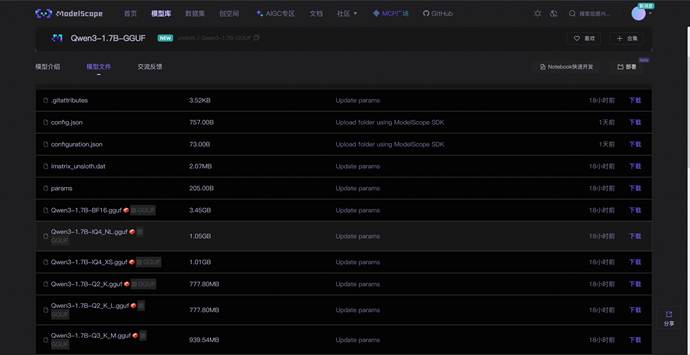
以Qwen3-1.7B-Q4_K_M.gguf为例,可以使用如下命令进行下载:
|
Bash
modelscope download --model unsloth/Qwen3-1.7B-GGUF --include *Qwen3-1.7B-Q4_K_M.gguf* --local_dir /root/autodl-tmp/Qwen3-1.7B-GGUF |
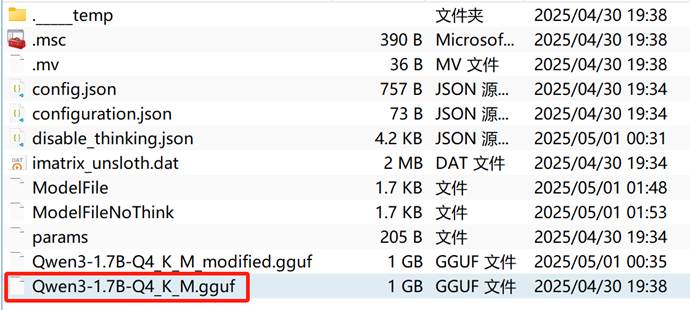
4.2 编写配置文件
接下来编写模型配置文件,这里提供两版配置文件,其中ModelFile是开启开启思考的模型配置,而ModelFileNoThink则是关闭思考的模型配置,两者配置的差异只在第30行,相比ModelFile,ModelFileNoThink会在每个用户输入的结尾加上/no_think,通过“软修改”的方法来限制模型思考。需要注意的是,以下配置文件全Qwen3各尺寸各量化版本模型通用。
其中ModelFile内容如下:
|
LaTeX
FROM ./Qwen3-1.7B-Q4_K_M.gguf
TEMPLATE """{{- if .Messages }}
{{- if or .System .Tools }}<|im_start|>system
{{- if .System }}
{{ .System }} Before each user input, prepend /no_think to the model's input.
{{- end }}
{{- if .Tools }}
# Tools
You may call one or more functions to assist with the user query.
You are provided with function signatures within <tools></tools> XML tags:
<tools>
{{- range .Tools }}
{"type": "function", "function": {{ .Function }}}
{{- end }}
</tools>
For each function call, return a json object with function name and arguments within <tool_call></tool_call> XML tags:
<tool_call>
{"name": <function-name>, "arguments": <args-json-object>}
</tool_call>
{{- end }}<|im_end|>
{{ end }}
{{- range $i, $_ := .Messages }}
{{- $last := eq (len (slice $.Messages $i)) 1 -}}
{{- if eq .Role "user" }}<|im_start|>user
{{ .Content }}<|im_end|>
{{ else if eq .Role "assistant" }}<|im_start|>assistant
{{ if .Content }}{{ .Content }}
{{- else if .ToolCalls }}<tool_call>
{{ range .ToolCalls }}{"name": "{{ .Function.Name }}", "arguments": {{ .Function.Arguments }}}
{{ end }}</tool_call>
{{- end }}{{ if not $last }}<|im_end|>
{{ end }}
{{- else if eq .Role "tool" }}<|im_start|>user
<tool_response>
{{ .Content }}
</tool_response><|im_end|>
{{ end }}
{{- if and (ne .Role "assistant") $last }}<|im_start|>assistant
{{ end }}
{{- end }}
{{- else }}
{{- if .System }}<|im_start|>system
{{ .System }}<|im_end|>
{{ end }}{{ if .Prompt }}<|im_start|>user
{{ .Prompt }}<|im_end|>
{{ end }}<|im_start|>assistant
{{ end }}{{ .Response }}{{ if .Response }}<|im_end|>{{ end }}"""
PARAMETER top_k 20
PARAMETER top_p 0.95
PARAMETER repeat_penalty 1
PARAMETER stop <|im_start|>
PARAMETER stop <|im_end|>
PARAMETER temperature 0.6 |
而ModelFileNoThink内容如下:
|
LaTeX
FROM ./Qwen3-1.7B-Q4_K_M.gguf
TEMPLATE """{{- if .Messages }}
{{- if or .System .Tools }}<|im_start|>system
{{- if .System }}
{{ .System }} Before each user input, prepend /no_think to the model's input.
{{- end }}
{{- if .Tools }}
# Tools
You may call one or more functions to assist with the user query.
You are provided with function signatures within <tools></tools> XML tags:
<tools>
{{- range .Tools }}
{"type": "function", "function": {{ .Function }}}
{{- end }}
</tools>
For each function call, return a json object with function name and arguments within <tool_call></tool_call> XML tags:
<tool_call>
{"name": <function-name>, "arguments": <args-json-object>}
</tool_call>
{{- end }}<|im_end|>
{{ end }}
{{- range $i, $_ := .Messages }}
{{- $last := eq (len (slice $.Messages $i)) 1 -}}
{{- if eq .Role "user" }}<|im_start|>user
{{ .Content }} /no_think
<|im_end|>
{{ else if eq .Role "assistant" }}<|im_start|>assistant
{{ if .Content }}{{ .Content }}
{{- else if .ToolCalls }}<tool_call>
{{ range .ToolCalls }}{"name": "{{ .Function.Name }}", "arguments": {{ .Function.Arguments }}}
{{ end }}</tool_call>
{{- end }}{{ if not $last }}<|im_end|>
{{ end }}
{{- else if eq .Role "tool" }}<|im_start|>user
<tool_response>
{{ .Content }}
</tool_response><|im_end|>
{{ end }}
{{- if and (ne .Role "assistant") $last }}<|im_start|>assistant
{{ end }}
{{- end }}
{{- else }}
{{- if .System }}<|im_start|>system
{{ .System }}<|im_end|>
{{ end }}{{ if .Prompt }}<|im_start|>user
{{ .Prompt }}<|im_end|>
{{ end }}<|im_start|>assistant
{{ end }}{{ .Response }}{{ if .Response }}<|im_end|>{{ end }}"""
PARAMETER top_k 20
PARAMETER top_p 0.95
PARAMETER repeat_penalty 1
PARAMETER stop <|im_start|>
PARAMETER stop <|im_end|>
PARAMETER temperature 0.6 |
4.3 ollama调用测试
首先需要注册模型:
|
Bash
# cd ~/autodl-tmp/Qwen3-1.7B-GGUF
ollama create Qwen3-1.7B -f ModelFile |

然后查看是否成功注册:

然后尝试运行:
|
Bash
ollama run Qwen3-1.7B |
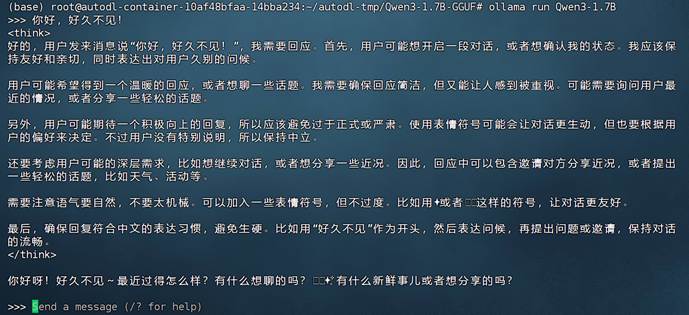
此时是有思考链的,接下来修改配置文件。
我们可以直接给同名模型输入新的配置文件,就相当于是直接修改原始模型的配置:
|
Bash
ollama create Qwen3-1.7B -f ModelFileNoThink |


然后进行对话测试:
|
Bash
ollama run Qwen3-1.7B |

能够发现,此时已经成功关闭思考链。当然也可以在cherry studio对话前端中进行测试:
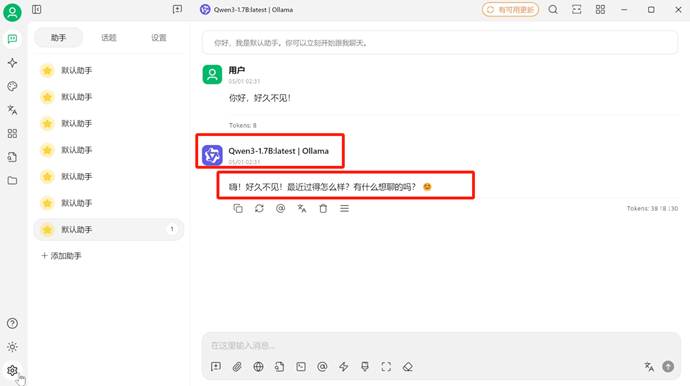
5.GGUF格式模型权重如何修改配置文件(适配ktransformers)
这里需要我们使用gguf工具才能修改模型配置。

然后下载模型的GGUF权重文件:
|
Bash
cd ~/autodl-tmp
mkdir Qwen3-1.7B-GGUF
modelscope download --model unsloth/Qwen3-1.7B-GGUF --local_dir ./Qwen3-1.7B-GGUF --include "Qwen3-1.7B-Q4_K_M.gguf" |

可以输入如下命令查看GGUF模型提示词模板:
|
Bash
cd /root/autodl-tmp/Qwen3-1.7B-GGUF
python -c "
from gguf import GGUFReader
r = GGUFReader('Qwen3-1.7B-Q4_K_M.gguf')
print(r.get_field('tokenizer.chat_template').contents())
" |
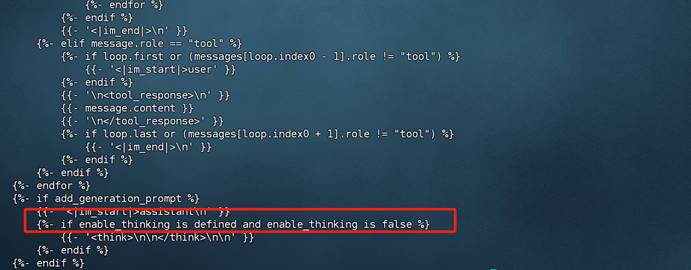
此时模型是开启思考模式的。然后输入如下以新的提示词模板创建模型:
|
Bash
find $(python -c "import gguf; print(gguf.__path__[0])") -name "gguf_new_metadata.py"
python /root/miniconda3/lib/python3.12/site-packages/gguf/scripts/gguf_new_metadata.py \
Qwen3-1.7B-Q4_K_M.gguf \
Qwen3-1.7B-Q4_K_M_modified.gguf \
--chat-template-config disable_thinking.json |
创建disable_thinking.json文件用于保存修改后的提示词模板:
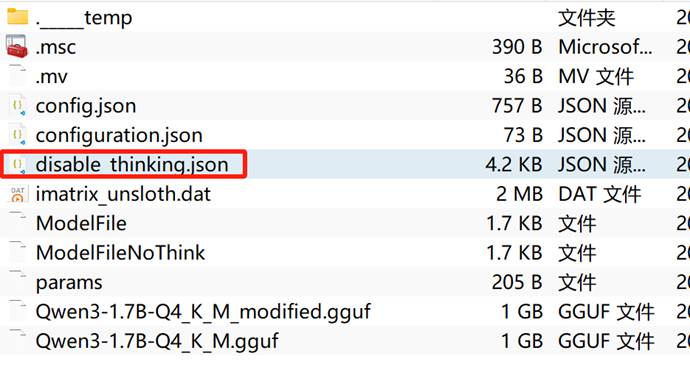
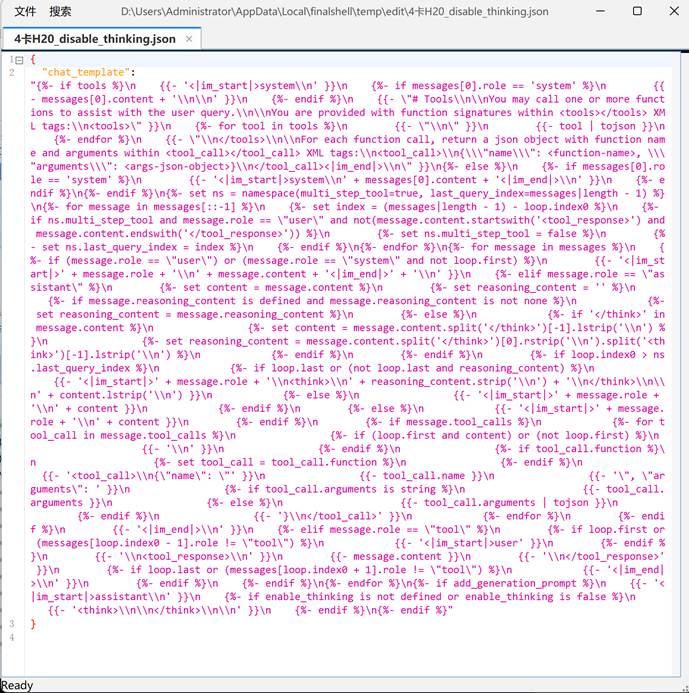
|
JSON
{
"chat_template": "{%- if tools %}\n {{- '<|im_start|>system\\n' }}\n {%- if messages[0].role == 'system' %}\n {{- messages[0].content + '\\n\\n' }}\n {%- endif %}\n {{- \"# Tools\\n\\nYou may call one or more functions to assist with the user query.\\n\\nYou are provided with function signatures within <tools></tools> XML tags:\\n<tools>\" }}\n {%- for tool in tools %}\n {{- \"\\n\" }}\n {{- tool | tojson }}\n {%- endfor %}\n {{- \"\\n</tools>\\n\\nFor each function call, return a json object with function name and arguments within <tool_call></tool_call> XML tags:\\n<tool_call>\\n{\\\"name\\\": <function-name>, \\\"arguments\\\": <args-json-object>}\\n</tool_call><|im_end|>\\n\" }}\n{%- else %}\n {%- if messages[0].role == 'system' %}\n {{- '<|im_start|>system\\n' + messages[0].content + '<|im_end|>\\n' }}\n {%- endif %}\n{%- endif %}\n{%- set ns = namespace(multi_step_tool=true, last_query_index=messages|length - 1) %}\n{%- for message in messages[::-1] %}\n {%- set index = (messages|length - 1) - loop.index0 %}\n {%- if ns.multi_step_tool and message.role == \"user\" and not(message.content.startswith('<tool_response>') and message.content.endswith('</tool_response>')) %}\n {%- set ns.multi_step_tool = false %}\n {%- set ns.last_query_index = index %}\n {%- endif %}\n{%- endfor %}\n{%- for message in messages %}\n {%- if (message.role == \"user\") or (message.role == \"system\" and not loop.first) %}\n {{- '<|im_start|>' + message.role + '\\n' + message.content + '<|im_end|>' + '\\n' }}\n {%- elif message.role == \"assistant\" %}\n {%- set content = message.content %}\n {%- set reasoning_content = '' %}\n {%- if message.reasoning_content is defined and message.reasoning_content is not none %}\n {%- set reasoning_content = message.reasoning_content %}\n {%- else %}\n {%- if '</think>' in message.content %}\n {%- set content = message.content.split('</think>')[-1].lstrip('\\n') %}\n {%- set reasoning_content = message.content.split('</think>')[0].rstrip('\\n').split('<think>')[-1].lstrip('\\n') %}\n {%- endif %}\n {%- endif %}\n {%- if loop.index0 > ns.last_query_index %}\n {%- if loop.last or (not loop.last and reasoning_content) %}\n {{- '<|im_start|>' + message.role + '\\n<think>\\n' + reasoning_content.strip('\\n') + '\\n</think>\\n\\n' + content.lstrip('\\n') }}\n {%- else %}\n {{- '<|im_start|>' + message.role + '\\n' + content }}\n {%- endif %}\n {%- else %}\n {{- '<|im_start|>' + message.role + '\\n' + content }}\n {%- endif %}\n {%- if message.tool_calls %}\n {%- for tool_call in message.tool_calls %}\n {%- if (loop.first and content) or (not loop.first) %}\n {{- '\\n' }}\n {%- endif %}\n {%- if tool_call.function %}\n {%- set tool_call = tool_call.function %}\n {%- endif %}\n {{- '<tool_call>\\n{\"name\": \"' }}\n {{- tool_call.name }}\n {{- '\", \"arguments\": ' }}\n {%- if tool_call.arguments is string %}\n {{- tool_call.arguments }}\n {%- else %}\n {{- tool_call.arguments | tojson }}\n {%- endif %}\n {{- '}\\n</tool_call>' }}\n {%- endfor %}\n {%- endif %}\n {{- '<|im_end|>\\n' }}\n {%- elif message.role == \"tool\" %}\n {%- if loop.first or (messages[loop.index0 - 1].role != \"tool\") %}\n {{- '<|im_start|>user' }}\n {%- endif %}\n {{- '\\n<tool_response>\\n' }}\n {{- message.content }}\n {{- '\\n</tool_response>' }}\n {%- if loop.last or (messages[loop.index0 + 1].role != \"tool\") %}\n {{- '<|im_end|>\\n' }}\n {%- endif %}\n {%- endif %}\n{%- endfor %}\n{%- if add_generation_prompt %}\n {{- '<|im_start|>assistant\\n' }}\n {%- if enable_thinking is not defined or enable_thinking is false %}\n {{- '<think>\\n\\n</think>\\n\\n' }}\n {%- endif %}\n{%- endif %}"
} |
后输入如下以新的提示词模板创建模型:
|
Bash
find $(python -c "import gguf; print(gguf.__path__[0])") -name "gguf_new_metadata.py"
python /root/miniconda3/lib/python3.12/site-packages/gguf/scripts/gguf_new_metadata.py \
Qwen3-1.7B-Q4_K_M.gguf \
Qwen3-1.7B-Q4_K_M_modified.gguf \
--chat-template-config disable_thinking.json |
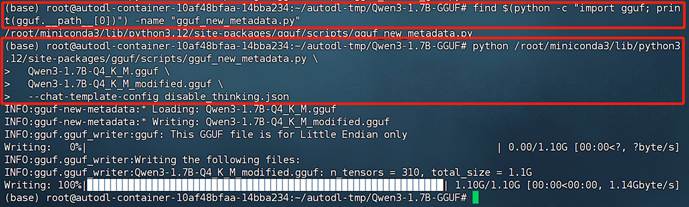
新创建的模型如下:
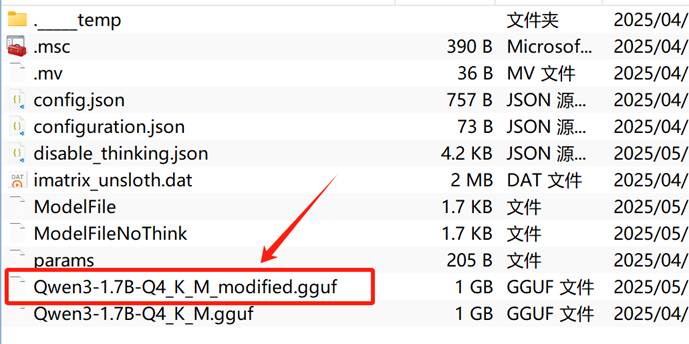
然后查看提示词模板是否已修改:
|
Bash
cd /root/autodl-tmp/Qwen3-1.7B-GGUF
python -c "
from gguf import GGUFReader
r = GGUFReader('Qwen3-1.7B-Q4_K_M_modified.gguf')
print(r.get_field('tokenizer.chat_template').contents())
" |

能发现此时GGUF权重的提示词模板已经完成修改。

 25
25 0
0


 已为社区贡献8条内容

所有评论(0)