调用LangChain 的工具(Tool Calling) 功能,它允许 大语言模型(LLM) 调用外部工具(如计算器、数据库查询、API 调用等),从而增强其功能
调用外部工具(如计算器、数据库查询、API 调用等),从而增强其功能。例如,如果 LLM 需要执行数学运算,它可以调用一个计算函数,而不是自己尝试计算答案。方法是我们自定义乱写的一个方法,让模型直接调用这个方法它会不知道这个方法是什么的,因为我们并没有在工具中定义它,它会根据我们的提示工程(prompt)返回。这样,LLM 既可以聊天,又可以。方法被模型识别并正确返回结果。这就引出了下面的内容。✅
为了更直观的展示LangChain 的工具(Tool Calling) 功能,我先通过代码做个对比:
第一种:使用工具功能
代码如下:
import getpass
import os
from langchain.chat_models import init_chat_model
from langchain_core.tools import tool
from langchain_core.messages import HumanMessage, ToolMessage,SystemMessage


# 如果没有设置 GROQ_API_KEY,则提示用户输入
if not os.environ.get("GROQ_API_KEY"):
    os.environ["GROQ_API_KEY"] = getpass.getpass("Enter API key for Groq: ")

# 使用 @tool 装饰器注册工具函数
@tool
def abcefikfs(a: int, b: int) -> str:
    """abcefikfs do nothing."""
    return 'ffffff'

# 初始化 Llama 模型,使用 Groq 后端
llm = init_chat_model("llama3-8b-8192", model_provider="groq", temperature=0)

# 将工具绑定到模型上
tools = [abcefikfs]
llm_with_tools = llm.bind_tools(tools)

messages=[SystemMessage(content="请只返回最终结果,不要解释,如果没有找到结果,请返回无法找到答案")]
query = "Use function abcefikfs with a=2 and b=3 and return the result."
# print(llm_with_tools.invoke(query).tool_calls)

messages = [HumanMessage(query)]
ai_msg = llm_with_tools.invoke(messages)
messages.append(ai_msg)
for tool_call in ai_msg.tool_calls:
    selected_tool = {"abcefikfs": abcefikfs}[tool_call["name"].lower()]
    tool_output = selected_tool.invoke(tool_call["args"])
    messages.append(ToolMessage(tool_output, tool_call_id=tool_call["id"]))

messages.append(HumanMessage(content=f"The function returned: {tool_output}. Please summarize."))
# 第二次调用:将工具输出和额外提示传回给模型,生成最终答案
response = llm.invoke(messages)
print("\nFinal Response:", response.content)
返回结果:
abcefikfs 方法被模型识别并正确返回结果。
第二种:不使用工具,直接用模型返回答案
部分代码如下:
messages = [
    SystemMessage(content="请只返回最终结果,不要解释,如果没有找到结果,请返回无法找到答案"),
    HumanMessage(content="Use function abcefikfs with a=2 and b=3 and return the result.")
]
# 不使用工具,将问题传给模型不用工具处理
response = llm.invoke(messages)
response.content
返回结果: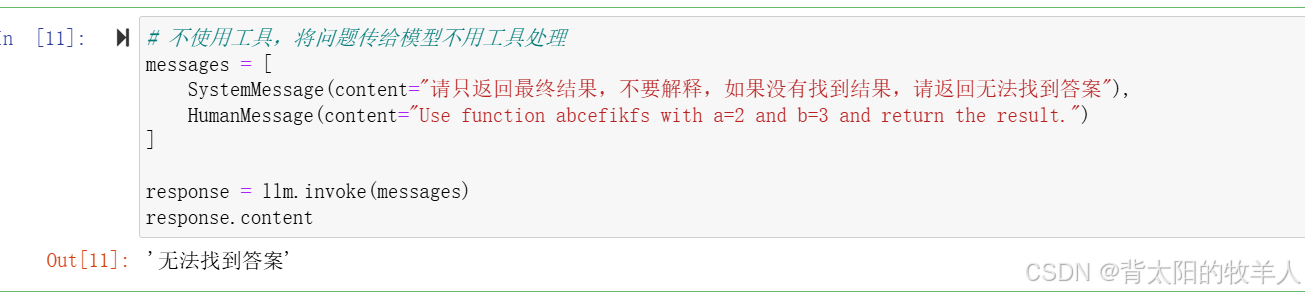
abcefikfs 方法是我们自定义乱写的一个方法,让模型直接调用这个方法它会不知道这个方法是什么的,因为我们并没有在工具中定义它,它会根据我们的提示工程(prompt)返回无法找到答案。
这就引出了下面的内容。
通过 LangChain 的工具调用(Tool Calling) 功能,让 大语言模型(LLM) 调用外部工具(如计算器、数据库查询、API 调用等),从而增强其功能。例如,如果 LLM 需要执行数学运算,它可以调用一个计算函数,而不是自己尝试计算答案。
核心概念
- 工具(Tool):一个可以被 LLM 调用的外部功能,比如加法、乘法、搜索引擎等。
- 工具调用(Tool Calling):LLM 生成调用工具所需的参数,具体是否执行工具调用由用户决定。
- 工具绑定(Binding Tools):把工具传递给 LLM,使 LLM 在需要时能够调用它们。
- 工具调用解析(Tool Call Parsing):解析 LLM 生成的工具调用,并转换成 Python 对象。
代码解析
1. 定义工具
from langchain_core.tools import tool

@tool
def add(a: int, b: int) -> int:
    """Adds a and b."""
    return a + b

@tool
def multiply(a: int, b: int) -> int:
    """Multiplies a and b."""
    return a * b

tools = [add, multiply]
解释:
@tool:这个装饰器把普通的 Python 函数转换成 LangChain 工具,使其可以被 LLM 识别和调用。add(a, b):接收两个整数,返回它们的和。multiply(a, b):接收两个整数,返回它们的积。tools = [add, multiply]:把所有工具存入列表,稍后传递给 LLM。
示例:
print(add(3, 5))       # 输出 8
print(multiply(4, 6))  # 输出 24
2. 使用 Pydantic 定义工具(另一种方式)
from pydantic import BaseModel, Field

class Multiply(BaseModel):
    a: int
    b: int
    def execute(self):
        return self.a * self.b

class Add(BaseModel):
    a: int
    b: int
    def execute(self):
        return self.a + self.b

tools = [Add, Multiply]
解释:
BaseModel:Pydantic 提供的数据模型,确保参数符合要求(如a和b必须是整数)。Field(..., description="xxx"):提供额外信息,帮助 LLM 理解工具的作用。tools = [Add, Multiply]:同样存入工具列表,供后续 LLM 使用。
示例:
add_data = Add(a=3, b=7)
print(add_data.a + add_data.b,add_data.execute())  # 输出 10 10
3. 绑定工具到 LLM
from langchain.chat_models import init_chat_model

llm = init_chat_model("llama3-8b-8192", model_provider="groq")
llm_with_tools = llm.bind_tools(tools)
解释:
init_chat_model("llama3-8b-8192", model_provider="groq"):- 初始化一个 Llama 3 8B 大语言模型,由 Groq 提供服务。
llm.bind_tools(tools):- 绑定工具,让 LLM 具备调用
add和multiply的能力。
- 绑定工具,让 LLM 具备调用
4. 让 LLM 调用工具
query = "What is 3 * 12? Also, what is 11 + 49?"
llm_with_tools.invoke(query).tool_calls
解释:
query:用户输入问题,要求计算3 * 12和11 + 49。llm_with_tools.invoke(query).tool_calls:- 调用 LLM 处理这个问题,并返回它决定调用的工具。
输出结果: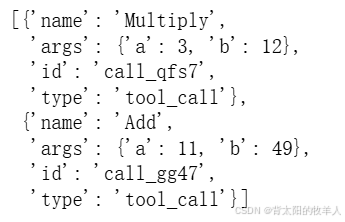
这表示:
- LLM 认为它需要调用
Multiply(a=3, b=12)来计算3 * 12。 - LLM 认为它需要调用
Add(a=11, b=49)来计算11 + 49。
5. 处理 LLM 返回的工具调用
from langchain_core.output_parsers.openai_tools import PydanticToolsParser

chain = llm_with_tools | PydanticToolsParser(tools=[Multiply, Add])
chain.invoke(query)
解释:
PydanticToolsParser:- 解析 LLM 生成的工具调用,并转换回 Pydantic 模型(如
Multiply(a=3, b=12))。
- 解析 LLM 生成的工具调用,并转换回 Pydantic 模型(如
chain = llm_with_tools | PydanticToolsParser(tools=[Multiply, Add]):- 组合 LLM 和工具解析器,使其输出结构化结果。
chain.invoke(query):- 运行整个调用链,最终输出:
[Multiply(a=3, b=12), Add(a=11, b=49)]
完整示例
from langchain_core.tools import tool
from langchain.chat_models import init_chat_model
from langchain_core.output_parsers.openai_tools import PydanticToolsParser

@tool
def add(a: int, b: int) -> int:
    """Adds a and b."""
    return a + b

@tool
def multiply(a: int, b: int) -> int:
    """Multiplies a and b."""
    return a * b

tools = [add, multiply]

# 初始化 LLM
llm = init_chat_model("llama3-8b-8192", model_provider="groq")
llm_with_tools = llm.bind_tools(tools)

# 让 LLM 解析查询
query = "What is 3 * 12? Also, what is 11 + 49?"
tool_calls = llm_with_tools.invoke(query).tool_calls

# 解析工具调用
chain = llm_with_tools | PydanticToolsParser(tools=[multiply, add])
results = chain.invoke(query)

print(results)
输出:
[Multiply(a=3, b=12), Add(a=11, b=49)]
接着可以执行这个结果:
chain = llm_with_tools | PydanticToolsParser(tools=[Multiply, Add])
chain.invoke(query)
输出: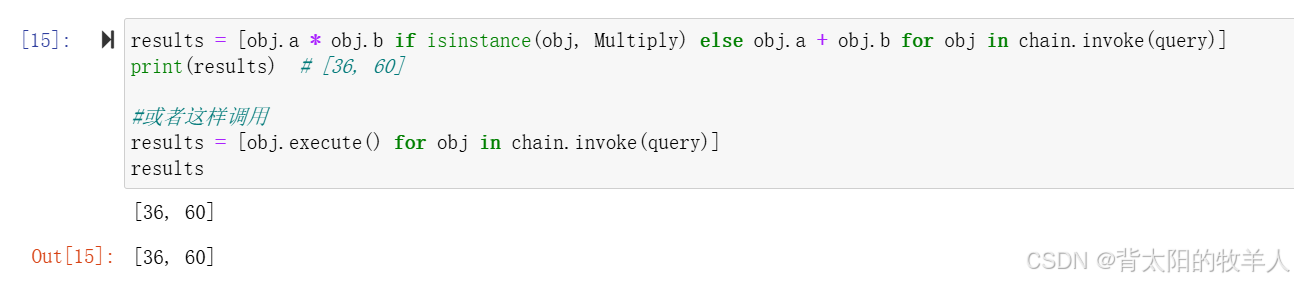
总结
- 工具调用(Tool Calling) 让 LLM 通过 外部函数 执行特定任务,而不是自己“猜”答案。
- 可以使用
@tool装饰器 或Pydantic模型 定义工具。 - 通过
bind_tools()绑定工具到 LLM,让 LLM 在需要时调用它们。 invoke()让 LLM 解析查询并 决定调用哪些工具。PydanticToolsParser解析工具调用的结果 并转换成 Python 对象。
这样,LLM 既可以聊天,又可以 调用真实工具,从而具备更强的功能,比如:
✅ 计算数学公式
✅ 查询数据库
✅ 调用 API
✅ 执行代码
✅ 检索搜索引擎数据

火山引擎开发者社区是火山引擎打造的AI技术生态平台,聚焦Agent与大模型开发,提供豆包系列模型(图像/视频/视觉)、智能分析与会话工具,并配套评测集、动手实验室及行业案例库。社区通过技术沙龙、挑战赛等活动促进开发者成长,新用户可领50万Tokens权益,助力构建智能应用。
更多推荐

 34
34 0
0- 0


 已为社区贡献7条内容

所有评论(0)