【大模型】Qwen, DeepSeek, GLM的API接口调用(官方示例+LangChain示例)
【代码】【大模型】Qwen, DeepSeek, GLM的API接口调用(官方示例+LangChain示例)
平常工作中,我们可能需要调用大模型API接口来提供服务,这里对
Qwen, DeepSeek, GLM系列大模型的API接口调用方式进行一个记录,包括有大模型厂商官方提供的调用示例以及LangChain提供的调用示例。
1. 通义千问Qwen
- 官方教程:首次调用通义千问API_大模型服务平台百炼(Model Studio)-阿里云帮助中心 (aliyun.com)
- 阿里云百炼:https://bailian.console.aliyun.com/#/home
- 免费额度查询方式:模型免费额度赠送_大模型服务平台百炼(Model Studio)-阿里云帮助中心 (aliyun.com)
1.1 API_KEY
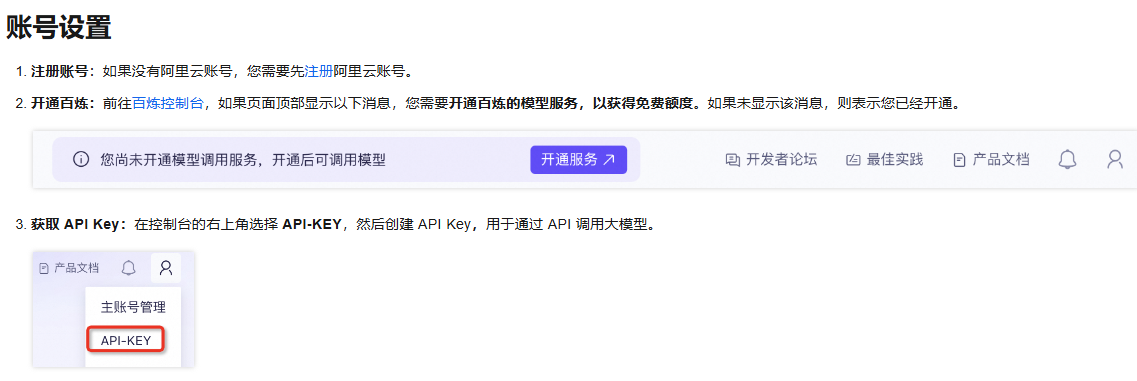
这里,我申请的API_KEY信息如下:
api_key="API_KEY"
base_url="https://dashscope.aliyuncs.com/compatible-mode/v1"
1.2 调用示例
pip install -U openai
(1)官网调用示例(来自阿里云百炼官网)
import os
from openai import OpenAI

try:
    client = OpenAI(
        # 若没有配置环境变量,请用百炼API Key将下行替换为:api_key="sk-xxx",
        # api_key=os.getenv("DASHSCOPE_API_KEY"),
        api_key="API_KEY",
        base_url="https://dashscope.aliyuncs.com/compatible-mode/v1",
        )

    completion = client.chat.completions.create(
        model="qwen-plus",  # 模型列表:https://help.aliyun.com/zh/model-studio/getting-started/models
        messages=[
            {'role': 'system', 'content': 'You are a helpful assistant.'},
            {'role': 'user', 'content': '你是谁?'}
            ]
    )
    print(completion.choices[0].message.content)
except Exception as e:
    print(f"错误信息:{e}")
    print("请参考文档:https://help.aliyun.com/zh/model-studio/developer-reference/error-code")
(2)Langchain调用示例:https://python.langchain.com/docs/integrations/chat/tongyi/
Langchain可用模型列表:https://python.langchain.com/docs/integrations/chat/
- Langchain: API调用
# pip install dashscopeimport os

os.environ["DASHSCOPE_API_KEY"] = "API_KEY"
from langchain_community.chat_models.tongyi import ChatTongyi
from langchain_core.messages import HumanMessage

chatLLM = ChatTongyi(
    streaming=True,)
res = chatLLM.stream([HumanMessage(content="hi")], streaming=True)
for r in res:
    print("chat resp:", r)
- Langchain: Tool Calling
from langchain_community.chat_models.tongyi import ChatTongyi
from langchain_core.tools import tool

import os

os.environ["DASHSCOPE_API_KEY"] = "API_KEY"
@tooldef multiply(first_int: int, second_int: int) -> int:
    """Multiply two integers together."""    return first_int * second_int


llm = ChatTongyi(model="qwen-turbo")

llm_with_tools = llm.bind_tools([multiply])

msg = llm_with_tools.invoke("What's 5 times forty two")

print(msg)
2. DeepSeek
2.1 API_KEY
申请API_KEY官网:https://platform.deepseek.com/api_keys
这里,我申请的API_KEY信息如下:
deepseek_api_key: API_KEY
deepseek_api_base: "https://api.deepseek.com"
2.2 调用示例
(1)DeepSeek官网调用示例:https://api-docs.deepseek.com/zh-cn/
# pip3 install openai
from openai import OpenAI

client = OpenAI(api_key="API_KEY", base_url="https://api.deepseek.com")

response = client.chat.completions.create(
    model="deepseek-chat",
    messages=[
        {"role": "system", "content": "You are a helpful assistant"},        {"role": "user", "content": "Hello"},],
    stream=False)

print(response.choices[0].message.content)
(2)Langchain调用示例:https://python.langchain.com/docs/integrations/chat/deepseek/
Langchain可用模型列表:https://python.langchain.com/docs/integrations/chat/
from langchain_deepseek import ChatDeepSeek
import os

os.environ["DEEPSEEK_API_KEY"] = "API_KEY"
llm = ChatDeepSeek(
    model="deepseek-chat",    temperature=0,    max_tokens=None,    timeout=None,    max_retries=2,    # other params...)

messages = [
    (
        "system",
        "You are a helpful assistant that translates English to Chinese. Translate the user sentence.",
        ),
     ("human", "I love programming."),]
ai_msg = llm.invoke(messages)
print(ai_msg.content)
3. GLM
3.1 API_KEY
申请API_KEY官网:https://www.bigmodel.cn/usercenter/proj-mgmt/apikeys
这里,我申请的API_KEY信息如下:
zhipu_api_key: API_KEY
3.2 调用示例
(1)GLM官网调用示例:https://open.bigmodel.cn/dev/api/normal-model/glm-4
from zhipuai import ZhipuAI
client = ZhipuAI(api_key="API_KEY")  # 请填写您自己的APIKey
response = client.chat.completions.create(
    model="glm-4-plus",  # 请填写您要调用的模型名称
    messages=[
        {"role": "user", "content": "作为一名营销专家,请为我的产品创作一个吸引人的口号"},
        {"role": "assistant", "content": "当然,要创作一个吸引人的口号,请告诉我一些关于您产品的信息"},
        {"role": "user", "content": "智谱AI开放平台"},
        {"role": "assistant", "content": "点燃未来,智谱AI绘制无限,让创新触手可及!"},
        {"role": "user", "content": "创作一个更精准且吸引人的口号"}
    ],
)
print(response.choices[0].message)
(2)Langchain调用示例:https://python.langchain.com/docs/integrations/chat/zhipuai/
# pip install --upgrade httpx httpx-sse PyJWT

from langchain_community.chat_models import ChatZhipuAI
from langchain_core.messages import AIMessage, HumanMessage, SystemMessage
import os

os.environ["ZHIPUAI_API_KEY"] = "API_KEY"
chat = ChatZhipuAI(
    model="glm-4",    temperature=0.5,)

messages = [
    AIMessage(content="Hi."),
    SystemMessage(content="Your role is a poet."),
    HumanMessage(content="Write a short poem about AI in four lines."),
    ]

response = chat.invoke(messages)
print(response.content)  # Displays the AI-generated poem

火山引擎开发者社区是火山引擎打造的AI技术生态平台,聚焦Agent与大模型开发,提供豆包系列模型(图像/视频/视觉)、智能分析与会话工具,并配套评测集、动手实验室及行业案例库。社区通过技术沙龙、挑战赛等活动促进开发者成长,新用户可领50万Tokens权益,助力构建智能应用。
更多推荐

 24
24 0
0- 0


 已为社区贡献10条内容

所有评论(0)