Qwen3-VL的强化微调
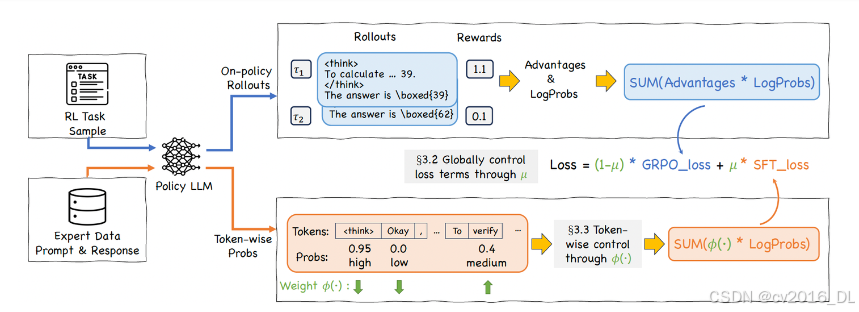
前面的是SFT-then-RLHF的范式,CHORD则是融合了SFT和RLHF,把SFT和在线GRPO的loss加权decay,同时使用和DFT类似的token级别的权重控制方法Importance Sampling,对于模型输出的prob的token和prob低的token,都赋予低的权重(prob高的已经学会了,继续高权重容易导致过拟合entropy collapse;效果上,用8b模型蒸馏q
0 环境安装
conda create -n swift python==3.10
conda init
conda activate swift

# 安装swift,源代码安装
git clone https://github.com/modelscope/ms-swift.git
cd ms-swift
pip install -e .

# 安装transformer==4.57.0和qwen-vl-utils==0.0.14,是qwen3-vl的要求
pip install transformers==4.57.0 qwen-vl-utils==0.0.14 vllm==0.11.0 -i https://mirrors.tuna.tsinghua.edu.cn/pypi/web/simple
qwen3-vl模型下载
#模型下载
from modelscope import snapshot_download
model_dir = snapshot_download('Qwen/Qwen3-VL-8B-Instruct',cache_dir='预期下载的路径')
1 SFT阶段
微调模型最重要的步骤是准备好数据集,和数据对应的jsonl文件,训练数据可以是query-response-images格式的,其中"\<image>"表示这个位置是一张图片,图片的位置在后面images的列表里面,有多少个"\<image>"标签,“images“列表里面就多少个地址,报错一般就是地址不对,以及注意地址是一个列表。
#jsonl格式的数据
{"query": "<image>你是一个图片描述专家,请描述这张图", "response": "66666", "images": ["image_path"]}
{"query": "eeeee<image>eeeee<image>eeeee", "response": "fffff", "history": [], "images": ["image_path1", "image_path2"]}
{"query": "EEEEE", "response": "FFFFF", "history": [["query1", "response2"], ["query2", "response2"]], "images": []}
模型训练脚本train_sft.sh:
CUDA_VISIBLE_DEVICES=0,1,2,3 MAX_PIXELS=1605632 swift sft \
--model 本地模型路径 \ # 本地模型路径,填写绝对路径,例如/xxx/xxx/
--dataset train_data.jsonl \  # 训练数据集
#-- val_dataset eval_data.jsonl \ # 验证集
--sft_type lora \   # lora微调/full为全参微调
--lorap_lr_ratio 10 \ #lora+的方式
--freeze_vit false \   # 如果为true,不微调vit模块
--freeze_aligner false \  # 如果为true,不微调merger模块
--freeze_llm false \    # 如果为true,不微调llm模块
#--freeze_parameters_ratio 0. \ # freeze参数的比例,sft_type=full的时候可以设置
--per_device_train_batch_size 1 \  # 训练数据上的batch_size
--per_device_eval_batch_size 1 \   # eval_set上的batch_size
--split_dataset_ratio 0.1 \   # 训练集里面多大比例作为验证集,如果没有输入验证集的话
--output_dir /home/xxx/output_dir/ \
--num_train_epochs 6 \   # epoch数,完整见过训练集的次数,以epoch为单位,收敛即可
--save_steps 20 \
--eval_steps 20 \
--save_total_limit 2 \  # 最大保存模型次数,为2时会保存验证集loss最小的模型和最后一个模型,不一定loss最小的模型最好,收敛情况下最后一个模型可能更好
--logging_steps 10 \
--seed 42 \
--learning_rate 1e-4 \  # 学习率
--init_weights true \
--lora_rank 8 \    # lora的r
--lora_alpha 32 \
--adam_beta1 0.9 \
--adam_beta2 0.95 \
--adam_epsilon 1e-08 \
--weight_decay 0.1 \
--gradient_accumulation_steps 16 \  # 每一个step模型见过的数据是per_device_train_batch_size*gradient_accumulation_steps,这两个相乘为16比较好
--max_grad_norm 1 \
--lr_scheduler_type cosine \
--warmup_ratio 0.05 \
--warmup_steps 0 \
--gradient_checkpointing false   # 开启梯度检查点为true时训练会变慢
如果想比较优雅,可以把system prompt单独传入:
--system 'You are a helpful assistant. You first thinks about the reasoning process in the mind and then provides the user with the answer.' \

或者
--system './system_prompt.txt'
merge_lora.sh执行后会生成checkpoint-xxx-merged/
swift export \
    --adapters output/vx-xxx/checkpoint-xxx \
    --merge_lora true
2 GRPO阶段
2.1 奖励函数设计
- 可以先写一个随机奖励的函数来测试,如果这个函数生成的reward还有方差都正常,再替换就可以,注意导入from swift.plugin import ORM, orms,同时在最下面进行注册
# RandomReward.py

import random
import logging
from typing import List
from swift.plugin import ORM, orms

# 配置日志
logging.basicConfig(
    level=logging.INFO,
    format='[RandomReward] %(message)s',
    handlers=[
        logging.FileHandler("random_reward_debug.log"),
        logging.StreamHandler()
    ]
)
logger = logging.getLogger(__name__)

class RandomReward(ORM):
    """
    调试专用:返回随机 reward
    目的:确认 Swift 是否正确调用 reward function,并传递梯度
    """
    def __call__(self, completions: List[str], solution: List[str], **kwargs) -> List[float]:
        batch_size = len(completions)
        # 生成 [0.1, 1.0] 之间的随机 reward
        rewards = [round(random.uniform(0.1, 1.0), 4) for _ in range(batch_size)]

        logger.info(f"Random rewards generated: {rewards}")
        logger.info(f"completions: {[(c[:50] + '...') if len(c) > 50 else c for c in completions]}")
        logger.info(f"solution: {[(s[:50] + '...') if len(s) > 50 else s for s in solution]}")

        return rewards

# 注册到 swift
orms['random_reward'] = RandomReward
2.2 roll-out使用Async的server模式
- GRPO的介绍可以参考ms-swift文档的介绍
- 特别的,有2种模式,Colocate(Internal) Mode和Async(External) Mode,Async模式训练与推理资源分离,启动单独的推理服务器
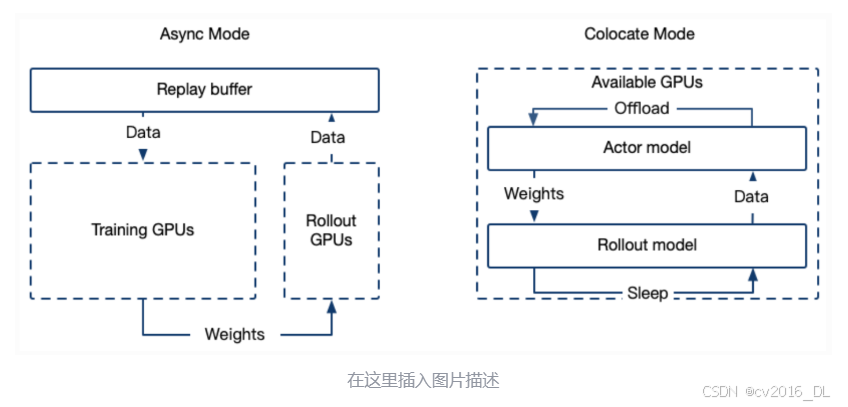
要进行训练,首先部署好roll-out的server:
CUDA_VISIBLE_DEVICES=4 MAX_PIXELS=1605632 swift rollout \
--model 模型地址 \
--max_new_tokens 4096 \
--infer_backend vllm \
--vllm_gpu_memory_utilization 0.9 \
--vllm_max_model_len 12288 \
--temperature 1.0 \ #这里要高点
--served_model_name Qwen3-VL-8B-Instruct \
--vllm_limit_mm_per_prompt '{"image": 2, "video": 0}' \ # 最多2张图,没有视频
--port 9008
2.3 GRPO的数据集格式
- 和SFT以及其他的RLHF的jsonl数据集格式要求不一样,grpo的jsonl需要"images"、“messages"和"solution"字段,其中solution里面放的内容是之前的response
- "messages"只需要有用户的输入,并且里面可以不需要"\<image\>"标签,图片会自动插入到文本前面
- 模型的输出结果也就是"assistant"的输出放到"solution"里面,"solution"这个键的内容会传到reward function
{
    "images": ["image_path1", "image_path2"],
    "messages": [
        {
            "role": "user",
            "content": "<image><image>你是一个图片信息提取专家,请从以上图片中提取出xxxx"
        }
    ],
    "solution": "。。。。"
}
2.4 GRPO训练
train_grpo.sh
CUDA_VISIBLE_DEVICES=0,1,2,3 \
MAX_PIXELS=1605632 \
NPROC_PER_NODE=4 \
swift rlhf \
    --rlhf_type grpo \
    --model SFT后的merged的模型地址 \
    --external_plugins RandomReward.py的路径 \
    --reward_funcs random_reward \
    --use_vllm true \
    --vllm_mode server \
    --vllm_server_host 127.0.0.1 \
    --vllm_server_port 9008 \  # roll-out server的端口
    --train_type lora \
    --torch_dtype bfloat16 \
    --dataset train_grpo.jsonl \
    --max_completion_length 4096 \
    --num_train_epochs 2 \
    --per_device_train_batch_size 1 \
    --per_device_eval_batch_size 1 \
    --learning_rate 1e-4 \
    --gradient_accumulation_steps 8 \
    --save_strategy 'steps' \
    --eval_strategy 'steps' \
    --eval_steps 10 \
    --save_steps 10 \
    --save_total_limit 2 \
    --logging_steps 1 \
    --output_dir output/grop_output \
    --warmup_ratio 0.01 \
    --num_generations 8 \
    --generation_batch_size 8 \
    --temperature 1.0 \
    --log_completions true \
    --async_generate true \
    --beta 0.001
3 CHORD训练
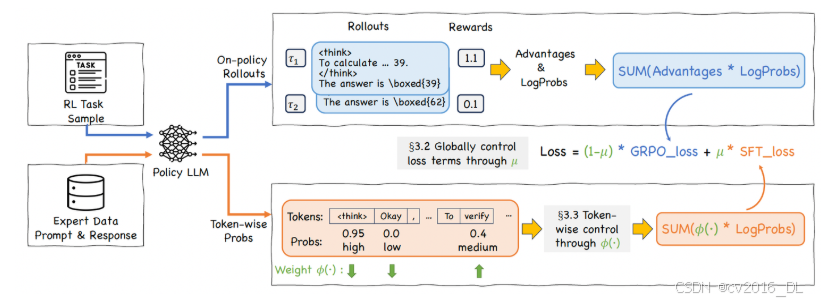
- 已有的SFT-then-RLHF的方法,容易在SFT阶段发生过拟合,不好控制停止SFT的时机
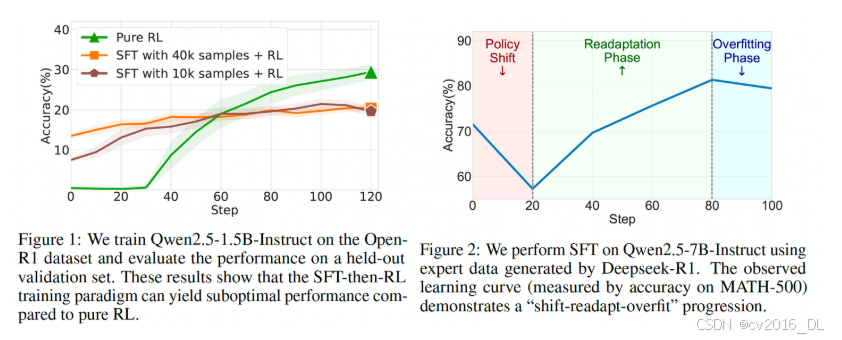
前面的是SFT-then-RLHF的范式,CHORD则是融合了SFT和RLHF,把SFT和在线GRPO的loss加权decay,同时使用和DFT类似的token级别的权重控制方法Importance Sampling,对于模型输出的prob的token和prob低的token,都赋予低的权重(prob高的已经学会了,继续高权重容易导致过拟合entropy collapse;prob低的本来模型就不太于倾向生成,不勉强)
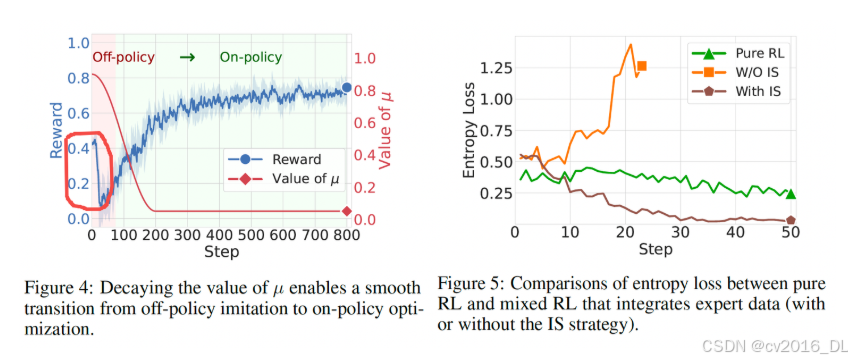
对于CHORD的介绍具体可以参考ms-swift的文档和原始的论文
chord.sh与grpo的类似:
CUDA_VISIBLE_DEVICES=0,1,2,3 \
MAX_PIXELS=1605632 \
NPROC_PER_NODE=4 \
swift rlhf \
    --rlhf_type grpo \
    --model Qwen3-VL-8B-Instruct地址 \
    --dataset SFT格式的jsonl地址 \
    --torch_dtype bfloat16 \
    --beta 0.0 \
    --num_train_epochs 4 \
    --per_device_train_batch_size 1 \
    --gradient_accumulation_steps 8 \
    --chord_sft_per_device_train_batch_size 1 \
    --chord_sft_dataset grpo格式的jsonl训练集 \
    --chord_enable_phi_function false \
    --chord_mu_warmup_steps 0 \
    --chord_mu_decay_steps 200 \
    --chord_mu_peak 0.9 \
    --chord_mu_valley 0.05 \
    --num_generations 8 \
    --train_type lora \
    --lorap_lr_ratio 10 \
    --freeze_vit true \
    --freeze_llm false \
    --external_plugins RandomReward.py的路径 \
    --reward_funcs random_reward \
    --use_vllm true \
    --vllm_mode colocate \
    --vllm_gpu_memory_utilization 0.4 \
    --vllm_max_model_len 8192 \
    --max_completion_length 4096 \
    --overlong_filter true \
    --offload_optimizer true \
    --offload_model true \
    --sleep_level 1 \
    --save_steps 20 \
    --learning_rate 1e-6 \
    --save_total_limit 2 \
    --logging_steps 1 \
    --warmup_ratio 0.05 \
    --log_completions true
效果上,用8b模型蒸馏qwen3-vl-256b的效果,如果原始的有92%的ACC,SFT的大约87%,CHORD可以到91%

火山引擎开发者社区是火山引擎打造的AI技术生态平台,聚焦Agent与大模型开发,提供豆包系列模型(图像/视频/视觉)、智能分析与会话工具,并配套评测集、动手实验室及行业案例库。社区通过技术沙龙、挑战赛等活动促进开发者成长,新用户可领50万Tokens权益,助力构建智能应用。
更多推荐
 18
18 0
0- 0


 已为社区贡献10条内容

所有评论(0)