冬至特别篇:陈奕迅都说“差不多冬至一早一晚还是有雨“,我开发的天气预报系统如何精准预测?
本文介绍了一个基于jQuery AJAX和高德地图API开发的天气预报系统。系统灵感来源于陈奕迅《葡萄成熟时》歌词描述的冬至天气变化,旨在为用户提供精准的天气预测。项目采用三层架构设计,包含用户界面层(HTML5+CSS3+jQuery)、业务逻辑层(天气数据获取、主题切换、留言管理)和数据服务层(高德天气API+LocalStorage)。系统实现了实时天气显示、三天预报、10个城市快速切换、4
前言
陈奕迅在《葡萄成熟时》中唱到:“差不多冬至一早一晚还是有雨”,这句歌词不仅道出了冬至时节天气的多变,也反映了人们对天气变化的细腻观察。随着冬至临近,天气确实变得难以预测,时而晴空万里,时而阴雨连绵。作为一个技术爱好者,我思考:我们能否用现代Web技术开发一个能够精准预测天气变化的系统?今天,我想和大家分享我开发的这个天气预报系统,它基于jQuery AJAX和高德地图API,实现了实时天气显示、三天预报、多主题切换和用户留言等功能。本文将详细介绍这个项目的完整实现过程。
项目背景与需求分析
1.1 灵感来源:从歌词到技术实现
“差不多冬至一早一晚还是有雨”,这句歌词不仅仅是文学表达,更是对自然现象的准确描述。冬至作为二十四节气之一,标志着寒冷天气的到来,此时:
- 温度变化剧烈:白天和夜晚温差显著
- 降水模式复杂:雨雪天气频繁交替
- 天气不确定性高:短期预报准确度面临挑战
这些自然现象恰恰为我们开发天气预报系统提供了真实的用户需求场景。我们希望通过技术手段,帮助用户更好地应对冬至期间的多变天气。
1.2 项目目标
基于真实需求,我们设定了以下项目目标:
- 实时天气显示:准确显示当前城市的天气状况、温度、湿度等信息
- 三天天气预报:提供未来3天的天气预报,包括温度范围和天气趋势
- 城市快速切换:支持10个主要城市的快速天气查询
- 多主题适配:提供4种不同的视觉主题,满足用户个性化需求
- 用户互动功能:集成留言板,增强用户参与感
技术栈与架构设计
2.1 技术选型
经过综合评估,我们选择了以下技术栈:
| 技术组件 | 选择理由 | 应用场景 |
|---|---|---|
| jQuery 3.6.0 | 成熟稳定、DOM操作简便、AJAX封装完善 | 页面交互、API调用、动态内容更新 |
| 高德地图天气API | 数据准确、免费额度高、文档完善 | 天气数据获取 |
| HTML5 + CSS3 | 原生支持、无需构建工具、响应式友好 | 页面结构和样式 |
| LocalStorage | 客户端存储、无需服务器、数据持久化 | 用户偏好和留言存储 |
2.2 整体架构
┌─────────────────────────────────────────┐
│              用户界面层              │
│  HTML5 + CSS3 + jQuery              │
├─────────────────────────────────────────┤
│              业务逻辑层              │
│  天气数据获取 | 主题切换 | 留言管理    │
├─────────────────────────────────────────┤
│              数据服务层              │
│  高德天气API | LocalStorage          │
└─────────────────────────────────────────┘
前端页面结构实现
3.1 HTML结构设计
页面采用语义化HTML5结构,主要包含以下模块:
<!DOCTYPE html>
<html lang="zh-CN">
<head>
    <meta charset="UTF-8">
    <meta name="viewport" content="width=device-width, initial-scale=1.0">
    <title>jQuery AJAX 天气预报查询</title>
    <link rel="stylesheet" href="style.css">
</head>
<body>
    <!-- 主题切换按钮 -->
    <div class="theme-switcher">
        <button id="themeToggle">🎨 切换主题</button>
        <div class="theme-options" id="themeOptions" style="display: none;">
            <button class="theme-btn" data-theme="default">🌞 默认主题</button>
            <button class="theme-btn" data-theme="dark">🌙 深色主题</button>
            <button class="theme-btn" data-theme="blue">💙 海洋主题</button>
            <button class="theme-btn" data-theme="green">💚 森林主题</button>
        </div>
    </div>

    <div id="content">
        <!-- 城市选择区域 -->
        <div id="location">
            <label for="citySelect">选择城市:</label>
            <select id="citySelect">
                <option value="101010100">北京</option>
                <option value="101020100">上海</option>
                <!-- 其他城市选项 -->
            </select>
        </div>

        <!-- 天气预报显示区域 -->
        <div id="forecast">
            <h3>未来三天天气预报</h3>
            <div class="forecast-container">
                <div class="forecast-day" id="forecastDay1">
                    <div class="forecast-date">--</div>
                    <div class="forecast-icon"></div>
                    <div class="forecast-temp">--°</div>
                    <div class="forecast-desc">--</div>
                </div>
                <!-- 其他两天预报卡片 -->
            </div>
        </div>

        <!-- 实时天气显示区域 -->
        <div id="weather">
            <div class="weather-icon"></div>
            <div class="weather-info">
                <div id="temperature">--°C</div>
                <div id="weatherDesc">--</div>
            </div>
        </div>

        <!-- 详细气象数据区域 -->
        <div id="now">
            <table>
                <tr>
                    <td colspan="2">相对湿度</td>
                    <td colspan="2" id="humidity">--%</td>
                </tr>
                <tr>
                    <td colspan="2">风向风力</td>
                    <td colspan="2" id="wind">--</td>
                </tr>
                <tr>
                    <td colspan="2">发布时间</td>
                    <td colspan="2" id="reportTime">--</td>
                </tr>
            </table>
        </div>

        <!-- 留言板区域 -->
        <div id="messageBoard">
            <h3>留言板</h3>
            <div class="message-form">
                <input type="text" id="userName" placeholder="您的昵称" maxlength="20">
                <textarea id="messageContent" placeholder="请输入您的留言..." maxlength="200"></textarea>
                <button id="submitMessage">发表留言</button>
            </div>
            <div class="message-list" id="messageList">
                <!-- 留言动态添加 -->
            </div>
        </div>
    </div>

    <script src="https://code.jquery.com/jquery-3.6.0.min.js"></script>
    <script src="script.js"></script>
</body>
</html>
3.2 响应式设计特点
- 移动优先:基础样式针对移动设备优化
- 弹性布局:使用百分比宽度和flex布局
- 媒体查询:针对不同屏幕尺寸调整样式
CSS样式与主题系统
4.1 基础样式架构
采用模块化的CSS组织方式:
/* 整体样式 */
body {
    text-align: center;
    background-color: silver;
    font-family: Arial, sans-serif;
    margin: 0;
    padding: 20px;
}

/* 内容容器样式 */
#content {
    margin: 0 auto;
    max-width: 480px;
    background-color: white;
    box-shadow: 10px 10px 10px black;
    border-radius: 10px;
    overflow: hidden;
}

/* 天气状况区域样式 */
#weather {
    font-size: 2em;
    padding: 30px 20px;
    display: flex;
    justify-content: center;
    align-items: center;
    background-color: #87CEEB;
}
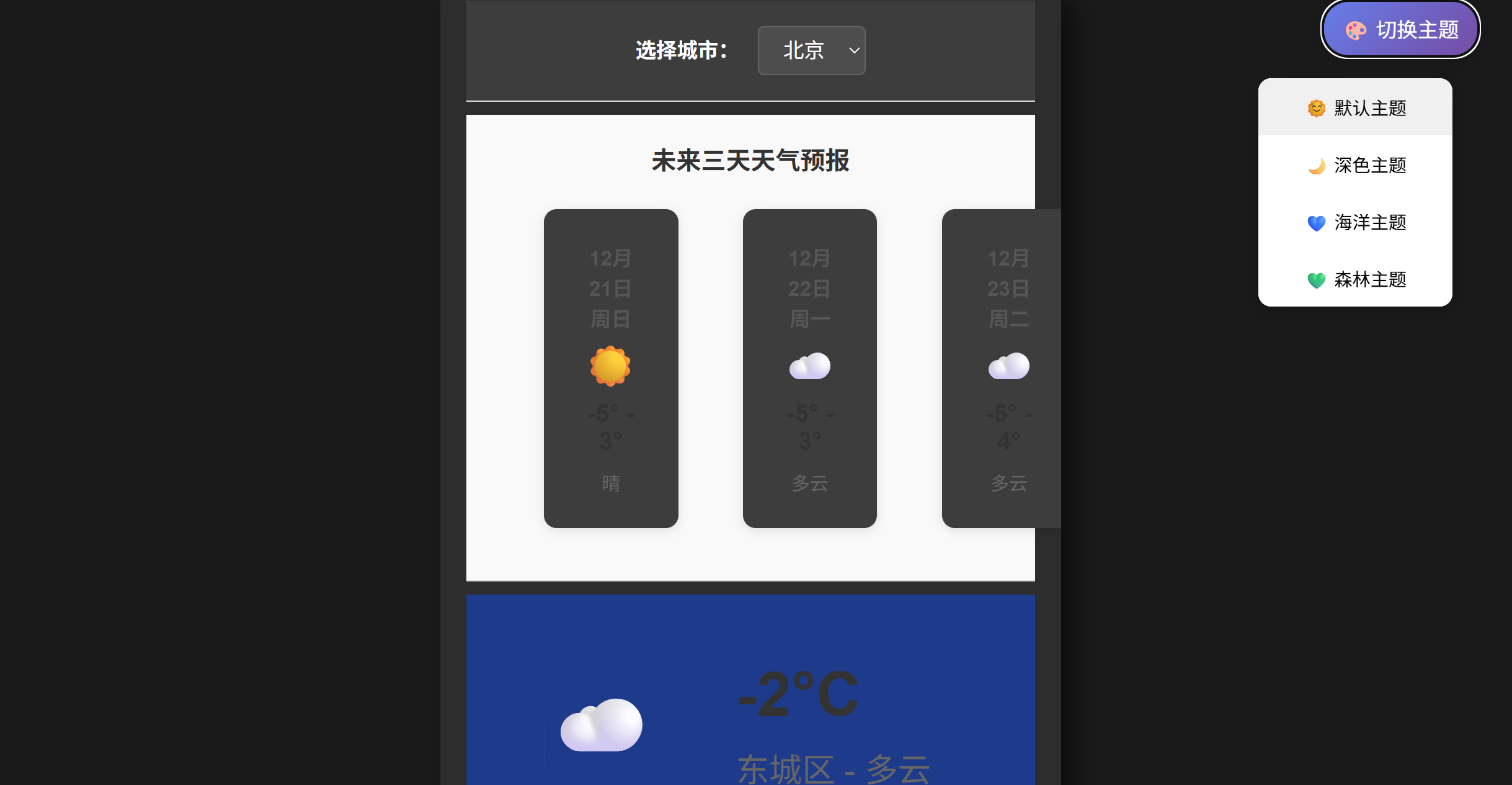
4.2 多主题系统实现
通过CSS类切换实现主题效果:
/* 深色主题 */
body.dark-theme {
    background-color: #1a1a1a;
    color: white;
}

body.dark-theme #content {
    background-color: #2d2d2d;
    box-shadow: 10px 10px 20px rgba(0, 0, 0, 0.5);
}

/* 海洋主题 */
body.ocean-theme {
    background: linear-gradient(135deg, #2E3192 0%, #1BFFFF 100%);
}

body.ocean-theme #content {
    background-color: rgba(255, 255, 255, 0.95);
    box-shadow: 10px 10px 30px rgba(0, 50, 100, 0.3);
}

/* 森林主题 */
body.forest-theme {
    background: linear-gradient(135deg, #134E5E 0%, #71B280 100%);
}

body.forest-theme #content {
    background-color: rgba(245, 255, 250, 0.95);
    box-shadow: 10px 10px 30px rgba(50, 100, 50, 0.3);
}
核心JavaScript实现
5.1 应用初始化与配置
$(document).ready(function() {
    // 高德地图天气API配置
    const API_KEY = "YOUR_API_KEY_HERE"; // 注意:实际部署时需要隐藏
    const API_URL = "https://restapi.amap.com/v3/weather/weatherInfo";
    const FORECAST_API_URL = "https://restapi.amap.com/v3/weather/weatherInfo";
    const USE_REAL_API = true;

    // 城市编码映射
    const cityCodes = {
        "101010100": "110101", // 北京
        "101020100": "310101", // 上海
        "101030100": "120101", // 天津
        // 其他城市映射...
    };

    // 页面加载时获取默认城市天气
    getWeatherData($("#citySelect").val());
});
5.2 天气图标映射系统
实现智能的天气图标匹配算法:
// 高德天气图标emoji映射
const weatherEmojis = {
    "00": "☀️",   // 晴
    "01": "☁️",   // 多云
    "02": "⛅",   // 少云
    "08": "🌦️",   // 小雨
    "09": "🌧️",   // 中雨
    "10": "🌧️",   // 大雨
    "11": "⛈️",   // 极端降雨
    "12": "🌨️",   // 小雪
    "13": "🌨️",   // 中雪
    "14": "🌨️",   // 大雪
    "19": "🌫️",   // 雾
    "99": "❓"    // 未知
};

// 根据天气文字获取对应的图标代码
function getWeatherCodeFromText(weatherText) {
    console.log("天气文字:", weatherText);
    weatherText = weatherText.trim();

    const weatherMap = {
        "晴": "00",
        "少云": "02",
        "晴间多云": "03",
        "多云": "01",
        "阴": "04",
        "阵雨": "05",
        "雷阵雨": "06",
        "小雨": "08",
        "中雨": "09",
        "大雨": "10",
        "暴雨": "11",
        "小雪": "12",
        "中雪": "13",
        "大雪": "14",
        "暴雪": "15",
        "雾": "19",
        "霾": "30"
        // 更多天气现象映射...
    };

    // 精确匹配
    for (let [text, code] of Object.entries(weatherMap)) {
        if (weatherText.includes(text)) {
            console.log("匹配到:", text, "=>", code);
            return code;
        }
    }

    // 模糊匹配
    if (weatherText.includes("雨")) return "08";
    if (weatherText.includes("雪")) return "12";
    if (weatherText.includes("云")) return "01";
    if (weatherText.includes("雾") || weatherText.includes("霾")) return "19";

    // 默认返回晴
    return "00";
}
5.3 天气数据获取与处理
实现实时的天气数据获取和界面更新:
// 获取天气数据函数
function getWeatherData(location) {
    showLoading();

    if (USE_REAL_API) {
        const adcode = cityCodes[location] || location;
        const cityName = cityNames[location] || "北京";

        // 获取实时天气
        $.ajax({
            url: API_URL,
            type: "GET",
            dataType: "json",
            data: {
                key: API_KEY,
                city: adcode,
                extensions: "base"  // 基础实况天气
            }
        }).done(function(response) {
            console.log("高德天气API响应:", response);

            hideLoading();

            if (response.status === "1" && response.lives && response.lives.length > 0) {
                updateWeatherDisplay(response.lives[0], cityName);
                showSuccessMessage("高德天气数据更新成功!");

                // 获取预报天气
                getForecastWeather(adcode, cityName);
            } else {
                showErrorMessage("获取天气数据失败: " + (response.info || "未知错误"));
            }
        }).fail(function(xhr, status, error) {
            hideLoading();
            showErrorMessage("获取天气数据失败:" + error);
        });
    }
}

// 更新天气显示
function updateWeatherDisplay(weatherData, cityName) {
    console.log("更新高德天气显示:", weatherData);

    // 更新城市名和天气描述
    $("#weatherDesc").text(weatherData.city + " - " + weatherData.weather);

    // 更新温度
    $("#temperature").text(weatherData.temperature + "°C");

    // 更新天气图标
    const weatherText = weatherData.weather || "未知";
    const weatherCode = getWeatherCodeFromText(weatherText);
    setWeatherIcon($(".weather-icon")[0], weatherCode, 64);

    // 更新详细气象数据
    $("#humidity").text(weatherData.humidity + "%");
    $("#wind").text((weatherData.winddirection || "无风") + " " + (weatherData.windpower || "0") + "级");

    // 格式化发布时间
    if (weatherData.reporttime) {
        const reportTime = new Date(weatherData.reporttime);
        const timeStr = `${reportTime.getHours().toString().padStart(2, '0')}:${reportTime.getMinutes().toString().padStart(2, '0')}`;
        $("#reportTime").text(timeStr);
    }
}

// 设置天气图标
function setWeatherIcon(element, iconCode, size = 48) {
    const icon = weatherEmojis[iconCode] || weatherEmojis["99"];
    element.innerHTML = `<span style="font-size: ${size}px; line-height: 1;">${icon}</span>`;
}
5.4 主题管理系统
实现优雅的主题切换功能:
// 主题切换功能
let currentTheme = localStorage.getItem('weatherTheme') || 'default';

function applyTheme(theme) {
    $('body').removeClass('dark-theme ocean-theme forest-theme');

    switch(theme) {
        case 'dark':
            $('body').addClass('dark-theme');
            break;
        case 'ocean':
            $('body').addClass('ocean-theme');
            break;
        case 'forest':
            $('body').addClass('forest-theme');
            break;
        default:
            break;
    }

    currentTheme = theme;
    localStorage.setItem('weatherTheme', theme);
}

// 初始化主题
applyTheme(currentTheme);

// 主题切换事件绑定
$('#themeToggle').click(function() {
    $('#themeOptions').slideToggle(200);
});

$('.theme-btn').click(function() {
    const selectedTheme = $(this).data('theme');
    applyTheme(selectedTheme);
    $('#themeOptions').slideUp(200);
    showSuccessMessage(`已切换到${$(this).text()}`);
});

// 点击页面其他地方关闭主题选项
$(document).click(function(event) {
    if (!$(event.target).closest('.theme-switcher').length) {
        $('#themeOptions').slideUp(200);
    }
});
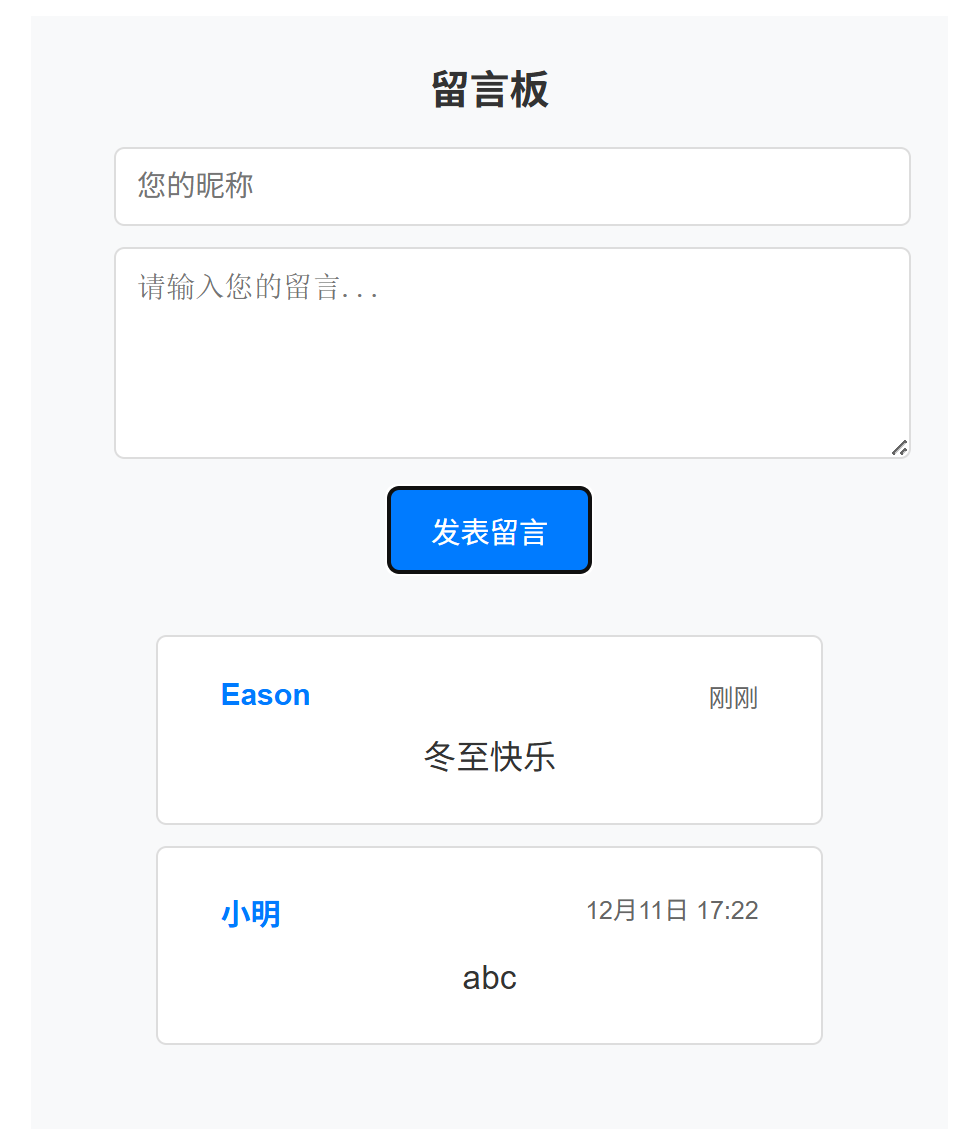
留言板功能实现
6.1 留言数据管理
// 留言板功能
let messages = JSON.parse(localStorage.getItem('weatherMessages')) || [];

// 显示留言
function displayMessages() {
    const messageList = $('#messageList');
    messageList.empty();

    if (messages.length === 0) {
        messageList.html('<div style="text-align: center; color: #999; padding: 20px;">暂无留言,快来发表第一条留言吧!</div>');
        return;
    }

    messages.sort((a, b) => new Date(b.time) - new Date(a.time));

    messages.forEach(function(message) {
        const messageHtml = `
            <div class="message-item">
                <div class="message-header">
                    <span class="message-author">${message.author}</span>
                    <span class="message-time">${formatTime(message.time)}</span>
                </div>
                <div class="message-content">${message.content}</div>
            </div>
        `;
        messageList.append(messageHtml);
    });
}

// 格式化时间
function formatTime(timestamp) {
    const date = new Date(timestamp);
    const now = new Date();
    const diff = now - date;

    if (diff < 60000) return '刚刚';
    if (diff < 3600000) return Math.floor(diff / 60000) + '分钟前';
    if (diff < 86400000) return Math.floor(diff / 3600000) + '小时前';

    return `${date.getMonth() + 1}月${date.getDate()}日 ${date.getHours().toString().padStart(2, '0')}:${date.getMinutes().toString().padStart(2, '0')}`;
}
6.2 留言提交与验证
// 提交留言
$('#submitMessage').click(function() {
    const userName = $('#userName').val().trim();
    const messageContent = $('#messageContent').val().trim();

    if (!userName) {
        showErrorMessage('请输入您的昵称!');
        $('#userName').focus();
        return;
    }

    if (!messageContent) {
        showErrorMessage('请输入留言内容!');
        $('#messageContent').focus();
        return;
    }

    if (messageContent.length > 200) {
        showErrorMessage('留言内容不能超过200字!');
        return;
    }

    const newMessage = {
        id: Date.now(),
        author: userName,
        content: messageContent,
        time: new Date().toISOString()
    };

    messages.push(newMessage);
    if (messages.length > 50) {
        messages = messages.slice(-50);
    }

    localStorage.setItem('weatherMessages', JSON.stringify(messages));

    $('#userName').val('');
    $('#messageContent').val('');
    displayMessages();
    showSuccessMessage('留言发表成功!');
});

// 回车键提交留言
$('#messageContent').keypress(function(e) {
    if (e.which === 13 && !e.shiftKey) {
        e.preventDefault();
        $('#submitMessage').click();
    }
});

// 初始化留言显示
displayMessages();
用户体验优化
7.1 消息提示系统
// 显示加载动画
function showLoading() {
    if ($("#loadingIndicator").length === 0) {
        $("#weather").append('<div id="loadingIndicator" class="loading"></div>');
    }
}

// 隐藏加载动画
function hideLoading() {
    $("#loadingIndicator").remove();
}

// 显示错误消息
function showErrorMessage(message) {
    removeMessages();
    $("#content").prepend(`<div class="error-message">${message}</div>`);
    setTimeout(removeMessages, 5000);
}

// 显示成功消息
function showSuccessMessage(message) {
    removeMessages();
    $("#content").prepend(`<div class="success-message">${message}</div>`);
    setTimeout(removeMessages, 3000);
}

// 移除所有消息
function removeMessages() {
    $(".error-message, .success-message").remove();
}
7.2 动画效果
/* 加载动画 */
.loading {
    display: inline-block;
    width: 20px;
    height: 20px;
    border: 3px solid #f3f3f3;
    border-top: 3px solid #3498db;
    border-radius: 50%;
    animation: spin 1s linear infinite;
    margin-left: 10px;
}

@keyframes spin {
    0% { transform: rotate(0deg); }
    100% { transform: rotate(360deg); }
}

/* 错误提示样式 */
.error-message {
    color: red;
    font-weight: bold;
    padding: 10px;
    background-color: #ffebee;
    border-radius: 5px;
    margin: 10px 20px;
}

/* 成功提示样式 */
.success-message {
    color: green;
    font-weight: bold;
    padding: 10px;
    background-color: #e8f5e8;
    border-radius: 5px;
    margin: 10px 20px;
}
部署与安全考虑
8.1 API密钥安全
在生产环境中,API密钥不应该直接暴露在前端代码中:
// 当前的做法(不安全)
const API_KEY = "d6d5c05daf45ce969a78dd25bd118819";

// 推荐的做法
// 1. 使用环境变量
const API_KEY = process.env.AMAP_API_KEY;

// 2. 通过后端代理API调用
// 3. 限制API调用域名和IP
8.2 错误处理机制
// 城市选择变化事件
$("#citySelect").change(function() {
    const selectedLocation = $(this).val();
    const selectedCity = $(this).find("option:selected").text();
    console.log("正在获取" + selectedCity + "的天气数据...");
    getWeatherData(selectedLocation);
});
项目总结
9.1 功能特点
通过这个天气预报系统,我们成功实现了:
- 精准的天气数据:通过高德地图API获取准确的实时和预报天气信息
- 智能图标匹配:实现了天气现象到emoji图标的智能映射算法
- 多主题支持:提供4种不同风格的主题,提升用户体验
- 用户互动功能:集成留言板,增强用户参与感
- 响应式设计:适配不同设备的屏幕尺寸
9.2 技术亮点
- jQuery AJAX的优雅使用:简化了API调用和DOM操作
- Emoji图标系统:使用emoji代替图片,减少资源加载
- LocalStorage数据持久化:无需后端即可保存用户偏好
- 模块化的代码组织:清晰的代码结构,便于维护
9.3 应用场景
正如陈奕迅歌词中提到的"差不多冬至一早一晚还是有雨",我们的系统能够帮助用户:
- 及时了解天气变化:应对冬至期间的多变天气
- 合理安排出行计划:根据预报调整日常活动
- 分享天气感受:通过留言板与其他用户交流
9.4 未来优化方向
基于当前的实现,我们可以考虑以下优化:
- 增加更多城市支持:扩展城市列表,支持更多地区
- 添加天气预警功能:集成恶劣天气预警通知
- 优化性能:添加数据缓存,减少API调用次数
- 增强安全性:通过后端代理保护API密钥
正如《葡萄成熟时》中唱到的:“我知日后路上或没有更美的邂逅”,但通过技术的力量,我们可以让每一天都变得更加美好。这个天气预报系统就是我们将技术服务于生活的具体实践。
参考资源
如果觉得这篇文章对您有帮助,请点赞、收藏和分享!有问题欢迎在评论区讨论交流!
【
】
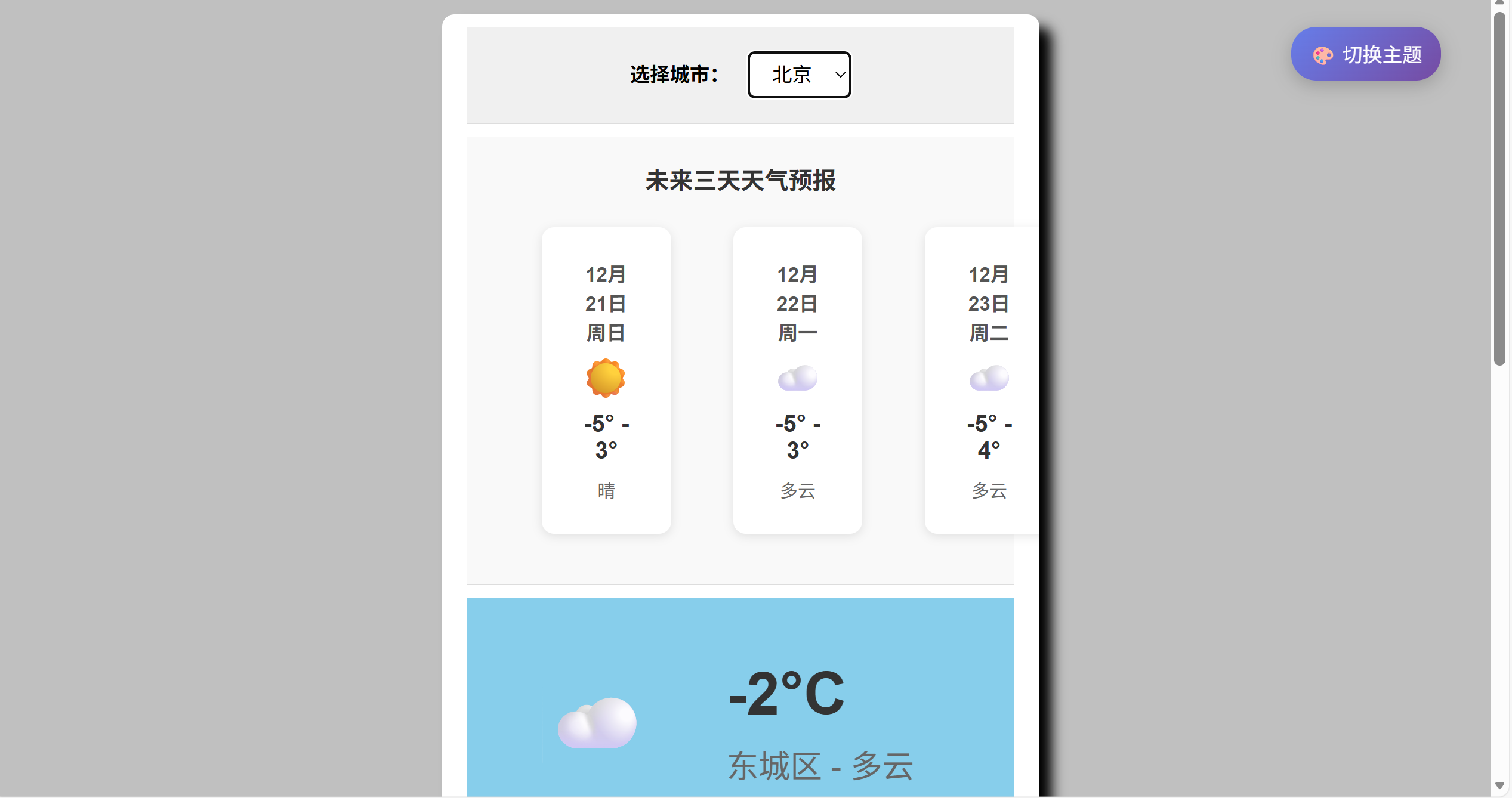
天气预报系统完整界面展示
【
】
四种主题切换效果对比
【
】
用户留言板互动功能
【
】
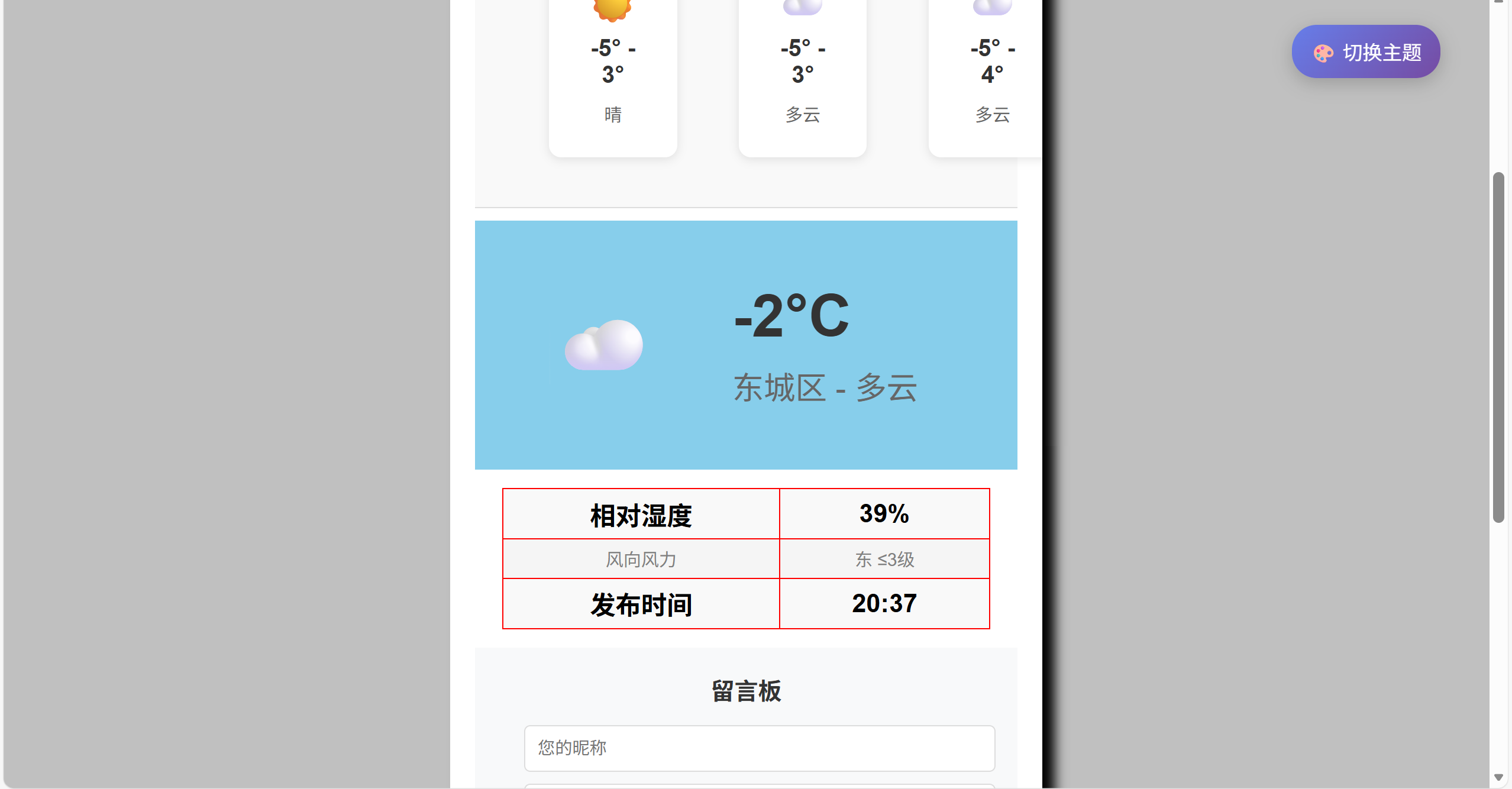
实时天气与预报数据展示
技术标签:天气预报、Web前端、jQuery、JavaScript、HTML5、CSS3、高德API、响应式设计、用户体验

火山引擎开发者社区是火山引擎打造的AI技术生态平台,聚焦Agent与大模型开发,提供豆包系列模型(图像/视频/视觉)、智能分析与会话工具,并配套评测集、动手实验室及行业案例库。社区通过技术沙龙、挑战赛等活动促进开发者成长,新用户可领50万Tokens权益,助力构建智能应用。
更多推荐
 16
16 0
0- 0


 已为社区贡献1条内容

所有评论(0)